Cross stitch pattern software...for sellers who'd stitch their own patternsPattern Keeper exports that work the first time
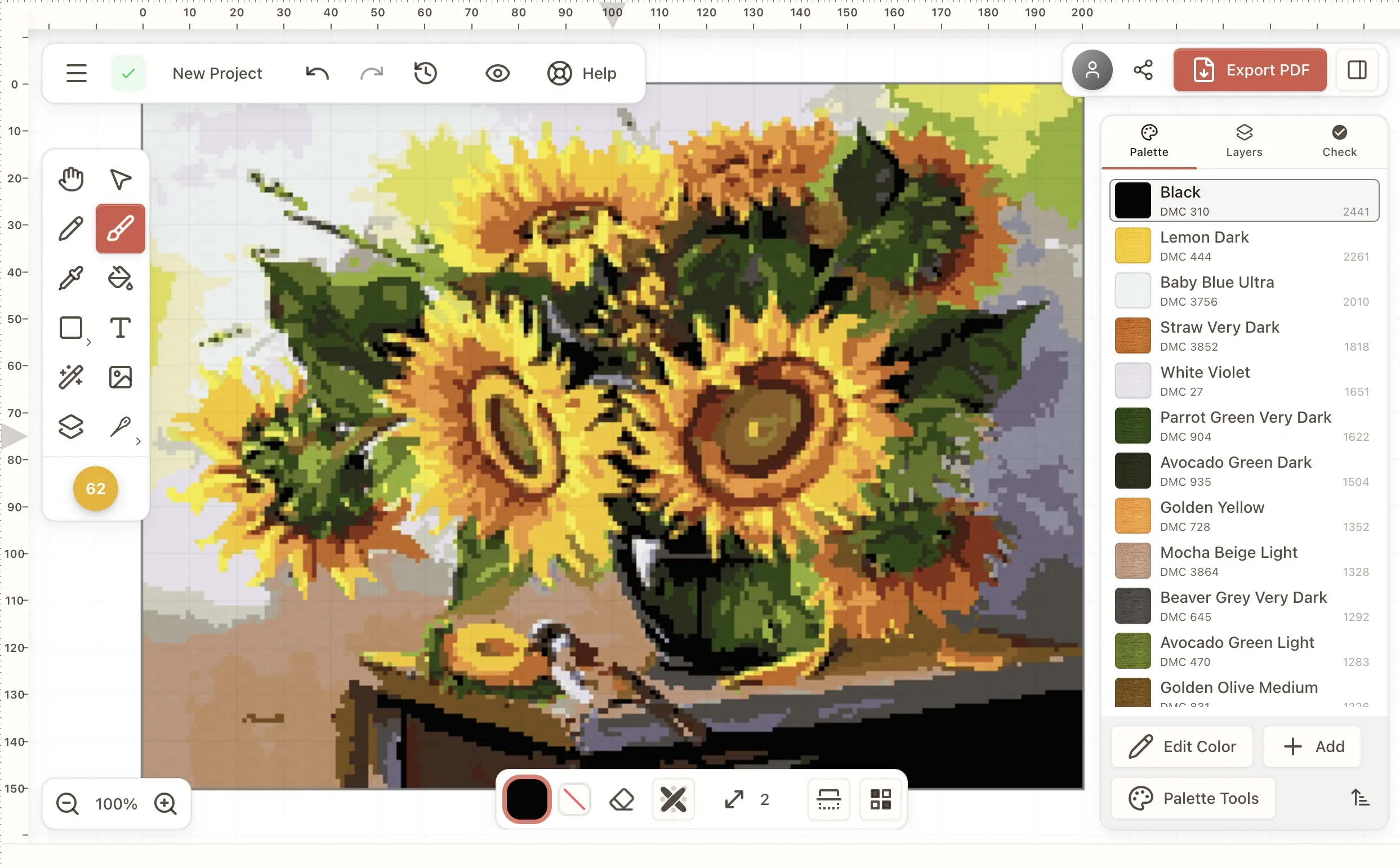
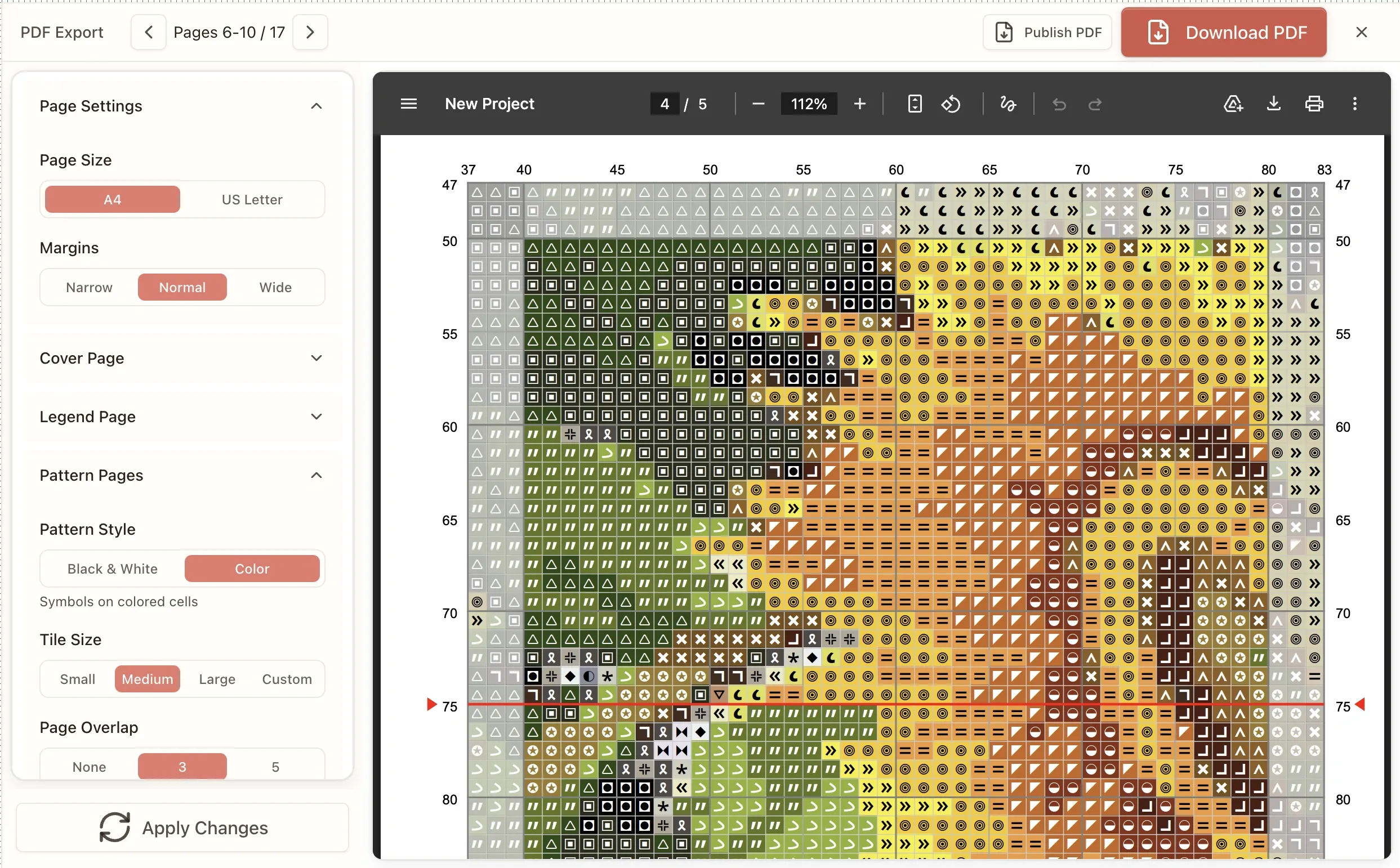
Import your .PAT and .OXS files from PCStitch or WinStitch — your catalog doesn't start over. ConfettiScope finds scattered stitches instantly; the confetti brush fixes them in seconds. Export Pattern Keeper compatible PDFs with print-optimized symbols and your custom branding. From $24.99.
One-click Pattern Keeper export. No font workarounds. No installation.
Customizable fonts, cover image & wording — any language · Pattern Keeper compatible
.PAT, .OXS & Aseprite import
Pattern Keeper export
Commercial license
Mac, Windows, iPad
See what your customers will receive
The export uses vector rendering with embedded symbol fonts — patterns stay crisp at any zoom level, no pixelated symbols when customers print at home. File sizes stay reasonable for email delivery and Etsy's instant download system.
Every PDF export includes:
- Symbol chart (color or black & white options)
- Complete thread legend with DMC, Anchor, Madeira, or Cosmo codes
- Stitch count per color
- Thread usage estimate in skeins
- Pattern preview image
- Dedicated backstitch legend (separate from full-stitch legend)
- Backstitch-only overlay pages — work the crosses from a clean grid first
- Your own instructions page, written in Markdown
Pro tier adds:
- Custom cover page with your logo and shop name
- Fully customizable PDF — pick the font, rewrite every heading and instruction, sell in any language
- Brandless PDFs (no Stitchmate branding)
- Patterns up to 2000×2000 stitches
- Commercial use license
Catch problems before your customers do
Spot confetti in seconds
ConfettiScope highlights every scattered single stitch across your entire pattern — the isolated stitches that cause constant thread changes and one-star reviews. The confetti brush cleans them up in a few strokes.
What used to take 2–6 hours of stitch-by-stitch replacement is now a 30-second pass. Run ConfettiScope, see the problem areas, brush them clean, done.
A stitchability score for every pattern you sell
The FLOW Score (0–100) measures confetti density, color clustering, palette efficiency, and overall workability. Patterns scoring 85+ stitch smoothly — your buyers will notice the difference. Below 60 means frustration ahead: fix it before it becomes a support email or a review that mentions "tedious."
PDF exports built for selling
Print-optimized symbols that work with Pattern Keeper
Every symbol in the library is designed for balanced legibility at print size — no marks that dominate the chart or vanish when printed small. Pattern Keeper compatibility is built into the export format by default: embedded fonts, proper Unicode mapping, clean grid structure, page breaks aligned to grid boundaries.
No font selection dialogs. No third-party PDF printers. No "export and pray." Your customers load the PDF into Pattern Keeper and it works.
Customers on iPhone, PC, or Mac who can't run Pattern Keeper? Stitchmate's own progress tracker is free in the browser on any device, and the Pattern Keeper comparison explains which to recommend to whom.
Backstitches that are actually readable — even in black and white
Most software treats backstitch as an afterthought — thin lines that vanish in a black-and-white printout. Stitchmate gives backstitches a dedicated legend with clear, distinct symbols. Your buyers can follow backstitch paths even on a B&W chart printed at home. A pattern with 15 backstitch colors gets its own clean legend — not entries buried in the main thread list where they get lost.
Partial stitches (half, quarter, three-quarter) render cleanly in the chart with proper positioning and clear visual distinction between stitch types — no ambiguity about which quarter of the cell is filled.
Color or black-and-white, your tile size, your overlap
Export in color, B&W, or both — many sellers offer both formats in their listings. Configure tile size and page overlap so charts align perfectly when your customer tapes printed pages together. No more misaligned grid lines at page breaks, no symbols cut in half at the edge of a page.
A legend you control
Drag thread colors into any order — group by usage, by color family, or however your customers prefer to work. Add per-thread comments: "blend with 3371 for shadow areas" or "substitute 3799 if unavailable." Your pattern instructions, built into the chart — not scattered across a separate PDF page.
Opens cleanly in Illustrator and Affinity
Most pattern PDFs fall apart the moment you open them to edit — the symbol font gets substituted and the whole chart fills with empty boxes. Turn on outlined symbols and every symbol becomes an editable shape instead. Resize, recolor and rework your chart in vector software without it turning to garbage. See how it works.
Your patterns, your brand, any thread
Bring your entire pattern collection
Import .PAT files from PCStitch. Import .OXS from WinStitch or any compatible cross stitch software. Import .XSD from Pattern Maker. Even import .aseprite files directly — if you're designing pixel-art-based patterns, your sprites convert without an intermediate step.
Your existing catalog migrates without recreation. Imports keep the file's own color names and hex values rather than silently re-matching everything to our thread library — so a palette you spent hours tuning arrives as you left it. You're not starting from zero.
One design, every thread brand
Design once in DMC, then
remap to Anchor, Cosmo, Madeira, or any of 50+ floss brands with one click. Each color
matched perceptually using CIEDE2000 — against thread colors sampled directly from official DMC and Anchor catalog cards, not approximated from screen
colors.
Save each version as a colorway — a named bundle of thread colors and their symbols — and switch between them in one undoable step without ever duplicating the file. Sell the same pattern to buyers in every market. One design, five thread brands, five Etsy listings.
The notation professional patterns actually need
Per-color strand counts — two strands for the fill, one for the backstitch, written into the pattern instead of scribbled in a note at the bottom of the PDF. Thread blending puts up to six colors through one needle with per-strand control, and the blend carries into the legend rather than becoming a manual annotation.
Every export ends with a thread purchasing page — codes, names, stitch counts, and estimated skein quantities. The materials list your buyers ask for, generated instead of counted by hand.
Three PDFs, one click
Download the bundle and you get the color chart, the black-and-white symbol chart, and the Pattern Keeper file — the three files buyers expect in a listing — generated together and named properly, not exported three times with three sets of settings.
Pattern Keeper supports neither backstitch nor partial stitches. Rather than let you find that out from a
customer, Stitchmate counts exactly how many backstitch segments and partial-stitch cells that export will drop and
tells you the numbers before you download.
Your brand on every page
Custom cover page with your logo, shop name, QR code, website, and social handles. Set the license — personal, commercial, Creative Commons, or your own wording. Pro tier removes all Stitchmate branding — your customers see your shop, not our software. What they receive looks like it came from a professional design studio, because it did.
Ninety settings, not four
Most pattern software gives you paper size and a color toggle. Stitchmate's PDF export exposes more than ninety settings — grid line color and thickness independently for major and minor lines, symbol size and contrast, ruler placement, center-line style, margins down to the point, seven typefaces, and a text-size preset for the whole document.
Write your own instructions page in Markdown, with placeholders like
{{patternName}}, {{colorCount}}, and
{{finishedSizeTable}} that fill themselves in from the pattern. Rename any heading. Change
the page-number wording. It's your document.
It survives Illustrator
Chart symbols normally ship as glyphs in a generated font, and vector editors substitute embedded fonts — which turns every symbol in your chart into tofu boxes the moment you open the file in Illustrator, Affinity, or Inkscape.
Turn on outlined symbols and they export as vector paths instead. Paths can't be substituted. If your workflow includes touching up the PDF before it goes in the listing, this is the setting that makes it possible — and there's a Latin-only typeface option that embeds nothing, so nothing can go missing either.
Built by a developer who actually listens
Stitchmate is built and maintained by a solo developer. Feature requests get read. Bug reports get fixed — usually within days, not years. The tool is actively improving because one person's reputation is directly attached to every export.
Coming next: A native desktop app for Mac and Windows — included free with any lifetime pass. Same editor, same features, offline access, no browser dependency. Currently in active development.
PCStitch hasn't shipped an update since 2016. When Pattern Keeper compatibility became essential for sellers, PCStitch users were left with forum workarounds and font hacks. That's what happens when software stops being someone's priority.
Stitchmate's development is public and ongoing. If something doesn't work the way you need it to, say so — the person who can fix it is the person who reads the message.
You can request and vote for new features, report bugs or share your feedback and ideas on this public portal or send me a private message with the contact form or via email at [email protected]. For general product questions, the frequently asked questions page covers pricing, unlocks, and PDF export in detail.
Commercial license for selling cross-stitch patterns
The Hobby tier is for personal projects — stitching gifts, designing for yourself, learning the tools. It doesn't include commercial rights. The commercial license covers every craft: cross stitch,needlepoint,diamond painting,fuse bead, andC2C crochet charts alike.
$24.99 for 30 days or $149 lifetime
- Commercial use license — sell patterns on Etsy, your own website, craft fairs, anywhere
- Brandless PDF exports — no Stitchmate mention on your products
- Custom branding — add your logo and shop name to exports
- Patterns up to 2000×2000 stitches — full coverage and large designs, with smooth editing performance even at maximum size
- Priority support
- Desktop app (coming soon) — native Mac and Windows app, included free with lifetime pass
The commercial license is straightforward: patterns you create with Pro are yours to sell. No royalties, no per-pattern fees, no reporting requirements.
Selling weekly? The $149 lifetime pass works out to under $3 per pattern in the first year — and nothing per pattern after that. See all pricing plans.
For a detailed comparison with PCStitch and WinStitch pricing, features, and workflows:see the full comparison →Or read all 12 cross stitch programs reviewed.
The workflow that's costing you hours
Design a pattern in PCStitch. Export to PDF. Load it into Pattern Keeper to test — and half the symbols are missing. Wrong fonts. Broken page breaks. Back to the software. Change the font. Re-export. Test again. Still broken.
Meanwhile, your customers expect Pattern Keeper compatibility. The reviews that mention it aren't kind when it doesn't work.
PCStitch hasn't had a major update since 2016. WinStitch works better, but you're still tied to a desktop app — transferring files between machines, no iPad option, no working from a coffee shop without syncing headaches.
If you're selling patterns on Etsy, you need software that keeps up with what buyers expect in 2026.
Cross stitch pattern software workflow: before and after
Export → test → fix fonts → re-export → test again
Export → test → done
Select each stitch, replace one at a time
ConfettiScope finds them; brush fixes in seconds
Print to PDF, check fonts, adjust margins
One-click export with configurable tiles and overlap
Manually recreate for each brand
One-click remap to 50+ brands
.PAT only (PCStitch) or start over
.PAT, .OXS, Aseprite import
Transfer files between computers
Open in any browser, pick up where you left off
PCStitch: No. WinStitch: Yes.
Yes — Mac, Windows, iPad, Chromebook
| Task | Desktop software | With Stitchmate |
|---|---|---|
| Pattern Keeper test | Export → test → fix fonts → re-export → test again | Export → test → done |
| Confetti cleanup | Select each stitch, replace one at a time | ConfettiScope finds them; brush fixes in seconds |
| PDF formatting | Print to PDF, check fonts, adjust margins | One-click export with configurable tiles and overlap |
| Thread brand variants | Manually recreate for each brand | One-click remap to 50+ brands |
| Import existing work | .PAT only (PCStitch) or start over | .PAT, .OXS, Aseprite import |
| Work on multiple devices | Transfer files between computers | Open in any browser, pick up where you left off |
| Mac compatibility | PCStitch: No. WinStitch: Yes. | Yes — Mac, Windows, iPad, Chromebook |
How to sell cross stitch patterns on Etsy
The workflow from design to Etsy listing is straightforward — and it works identically forneedlepoint charts, a niche where digital charts are still scarce: needlepointers on Reddit repeatedly say they'd gladly buy $5–15 charts "but that option doesn't really exist from the majority of needlepoint sellers."
Design your pattern in the editor — from scratch or by converting a photo. Use the confetti cleanup tool to ensure your patterns are stitchable. Check the FLOW Score — buyers notice the difference between a clean pattern and one full of scattered single stitches.
Export as PDF with symbols, thread legend, and stitch counts. Stitchmate's PDF export is Pattern Keeper compatible by default — no font workarounds, no special settings. This matters: Pattern Keeper users are among the most active buyers, and they specifically look for compatible patterns.
Run ConfettiScope before you export. Even a well-designed pattern can have a few scattered
stitches you missed. ConfettiScope highlights them across the entire pattern — fix them in seconds, check the FLOW
Score, then export with confidence. Your buyers notice the difference between a pattern that scores 85 and one that scores 60, even if they can't
name why.
List on Etsy as an instant digital download. Include the finished size, stitch count, color count, and thread brand in your listing. Mention Pattern Keeper compatibility — it's a meaningful selling point.
Stitchmate's commercial license is included in the Pro tier — design and sell unlimited patterns with no per-pattern fees.
FAQ: Cross Stitch Pattern Software for Sellers
What's the best cross stitch software for selling patterns?
For Etsy pattern sellers, the key requirements are Pattern Keeper compatible PDF exports, confetti cleanup tools, and a commercial license. Stitchmate Pro ($24.99 for 30 days or $149 lifetime) includes all three — plus ConfettiScope, brandless PDF output, and custom branding. PCStitch ($50–80 lifetime) is the industry standard on Windows but requires manual font configuration for Pattern Keeper compatibility. WinStitch ($30–50 lifetime) has one-click Pattern Keeper export but fewer confetti tools. Compare all cross stitch software →
Can I import my existing PCStitch or WinStitch patterns?
Yes. Stitchmate imports .PAT files (PCStitch), .OXS files (WinStitch and other cross stitch software), .XSD files (Pattern Maker), and .aseprite files for pixel-art-based designs. Your existing pattern collection transfers without recreation. Imports keep the file's own color names and hex values rather than re-matching them to our library — you don't lose your palette work.
How do I start selling cross stitch patterns on Etsy?
Design your pattern, export as PDF (Pattern Keeper compatible), and list as a digital download on Etsy. Include finished size, stitch count, color count, and thread brand in your listing. Use the fabric calculator to get exact dimensions for each Aida count. Mention Pattern Keeper compatibility — it's a meaningful selling point. You'll need software with a commercial license — Stitchmate Pro ($24.99 for 30 days or $149 lifetime) includes commercial rights, Pattern Keeper export, and ConfettiScope for quality checking.
What is ConfettiScope?
ConfettiScope is Stitchmate's pattern analysis tool that highlights every scattered single stitch across your entire pattern at a glance. Combined with the confetti brush tool, it lets you find and fix confetti in seconds — what used to take 2–6 hours of stitch-by-stitch replacement. Sellers use it as a quality gate before listing patterns.
How do I make my patterns Pattern Keeper compatible?
Pattern Keeper requires PDFs with specific formatting — embedded fonts, proper grid structure, and accurate color information. Our pattern PDF quality guide explains each requirement in detail. With PCStitch, this often requires workarounds like using specific fonts and third-party PDF printers. Stitchmate and WinStitch both offer one-click exports that produce Pattern Keeper compatible files without manual configuration.
Can I export cross stitch patterns in both color and black-and-white?
Yes. Stitchmate exports in color, black-and-white, or both. You can configure tile size and page overlap for multi-page patterns, and the export handles backstitch with a dedicated legend that stays readable even in B&W. Many sellers include both formats in their Etsy listings.
What software do Etsy pattern sellers use?
Most Etsy cross-stitch sellers use PCStitch or WinStitch/MacStitch. PCStitch is the most established but hasn't been updated since 2016 and has Pattern Keeper compatibility issues. WinStitch/MacStitch is more current and has one-click Pattern Keeper export. Stitchmate is a newer alternative — browser-based, works on any device, and includes Pattern Keeper compatible exports by default.
How do I remove confetti from cross-stitch patterns?
Confetti — scattered single stitches — is the most common complaint about photo-converted patterns. Most software requires selecting and replacing each stitch individually. Stitchmate has ConfettiScope, which highlights every confetti stitch across the entire pattern at a glance. Then use the confetti brush to clean them up in seconds — what used to take 2–6 hours. Learn more about confetti in cross stitch →
Is Stitchmate actively maintained?
Yes. Stitchmate is built by a solo developer and receives regular updates. The next major milestone is a native desktop app for Mac and Windows, included free with any lifetime pass. PCStitch hasn't been updated since 2016. WinStitch's last major update was in 2023. Feature requests and bug reports are read and typically addressed within days.
Do I need a commercial license to sell cross-stitch patterns?
It depends on the software. PCStitch and WinStitch include commercial rights in their standard pricing. With Stitchmate, the free and Hobby tiers are for personal use only — you need Pro ($24.99 for 30 days or $149 lifetime) to sell patterns commercially.
Can I convert photos to cross-stitch patterns to sell?
Yes, but the quality matters. Raw photo conversions often have too many colors and excessive confetti. You'll need to reduce colors (15–35 usually works for portraits — see pet portrait tips for animal-specific ranges), clean up confetti with ConfettiScope, and possibly add backstitch for definition. Stitchmate shows a FLOW Score during conversion — a quality metric that predicts how satisfying the pattern will be to stitch.
What thread brands should I design for?
DMC is the most widely available and what most buyers expect. Anchor and Madeira are common alternatives. Stitchmate supports 50+ floss brands including DMC, Anchor, Madeira, and Cosmo. With one-click thread brand remapping — or saved colorways that keep a DMC version and an Anchor version of the same chart side by side — you can sell one design as multiple Etsy listings. Read our DMC vs Anchor comparison to understand the differences.
How much does cross-stitch pattern software cost?
Pricing varies: Free options include Stitchmate free tier (personal use, limited features). One-time purchase options include PCStitch ($50–80) and WinStitch/MacStitch (~$52). Stitchmate offers Personal ($14.99 for 30 days or $99 lifetime, personal use) and Pro ($24.99 for 30 days or $149 lifetime, commercial use with .PAT import, ConfettiScope, and brandless exports).
What's the best cross-stitch software for Mac?
PCStitch is Windows-only. WinStitch has a Mac version (MacStitch, ~$52). Stitchmate runs in any browser, so it works on Mac, Windows, iPad, and Chromebook without installation. All features including .PAT import, ConfettiScope, and Pattern Keeper export work identically across platforms.
Test the export with your own pattern
Import a .PAT or .OXS file, run ConfettiScope, export the PDF, load it in Pattern Keeper. See exactly what your customers will see — before you commit to anything.
Import a pattern and test itFree tier includes full editing, ConfettiScope, and PDF preview. Pro tier required for commercial use and brandless exports.