Free cross stitch pattern makerDesign, create, and export cross stitch patterns online
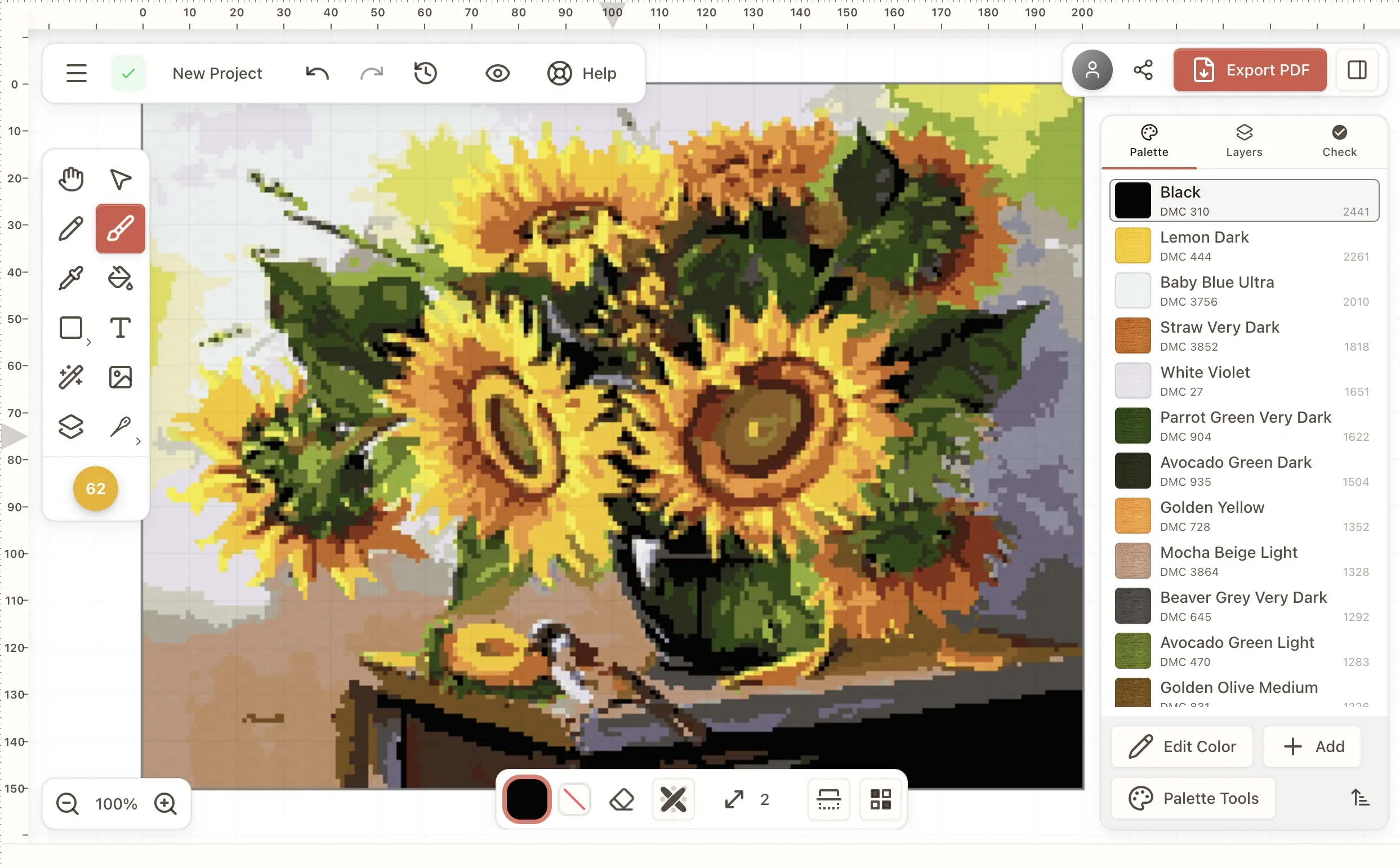
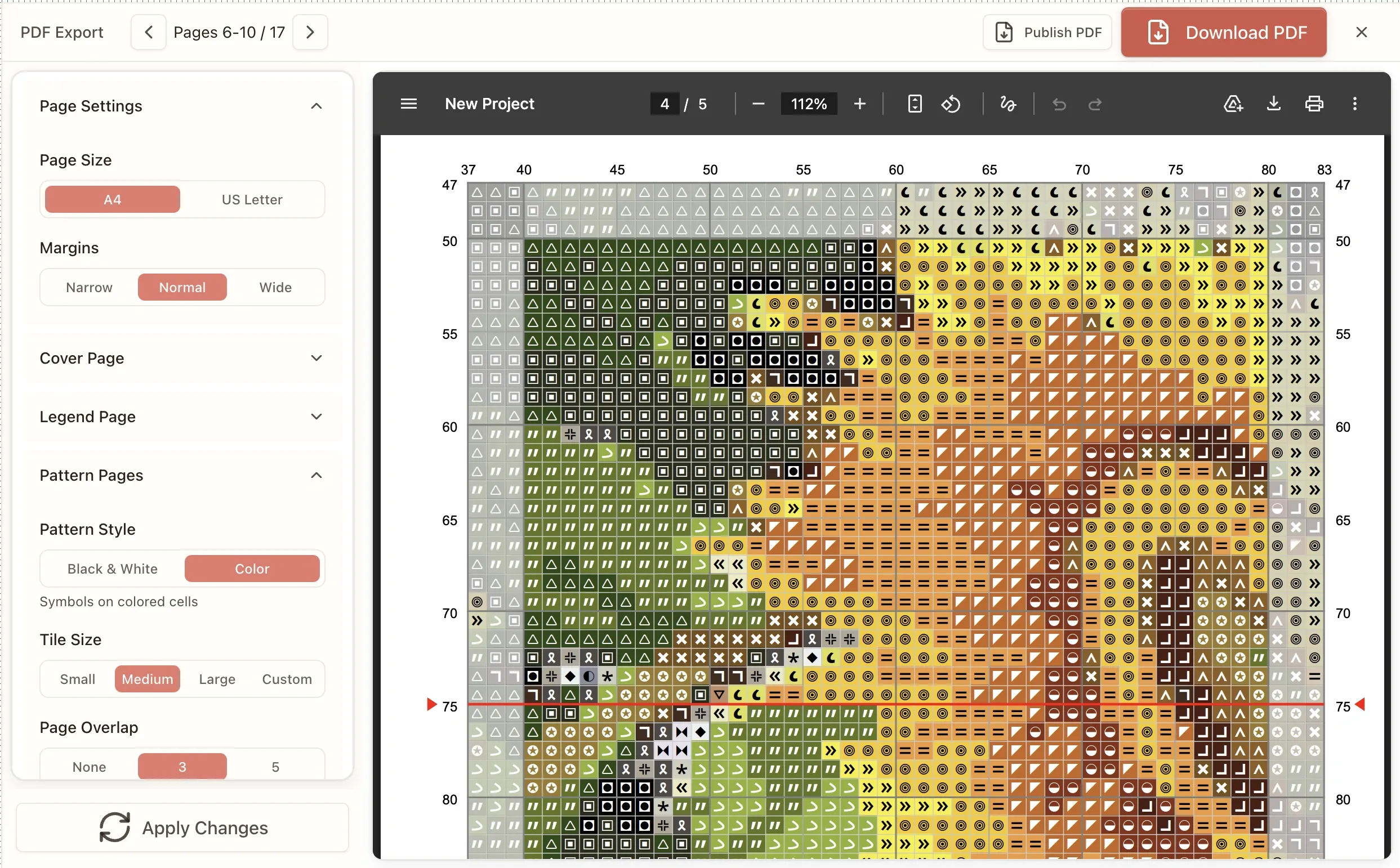
A full-featured cross stitch pattern maker in your browser — no download, no account. Draw, fill, add text and letters, clean up confetti, match to real thread colors across 50+ floss brands (DMC, Anchor, Cosmo, Madeira and more), and export a printable PDF you can trust. Free to start.
Free. No account required.
Hand-sampled thread color catalogs
Backstitch & partial stitches
Pattern Keeper compatible PDF export
Mac, Windows, iPad, Chromebook
Most pattern software feels like it was built in 2005
Clunky desktop apps that crash. Steep learning curves. Export formats that don't work with Pattern Keeper. Confetti scattered everywhere with no way to clean it up. And subscription fees for features you'll use twice.
You want to design a pattern, not fight with software.
Browse threads on r/CrossStitch about pattern software and you'll see the same frustration. Stitchers want modern tools that just work—in a browser, without a Windows-only installer from 2008.
From simple samplers to full-coverage designs
Original artwork
Draw pixel-by-pixel or use the image overlay tool to trace over a reference. Shapes, symmetry modes, and a snapping grid help you build geometric designs fast.
Text and quotes
Add text with the built-in text tool. Customize size and placement. Perfect for birth announcements, wedding samplers, or subversive stitching.
Pattern modifications
Import an existing pattern (PDF or image) and edit it. Change colors, resize, clean up confetti, remap to a different thread brand—make it yours.
Designs for selling
Export clean PDFs with professional formatting. Choose your own symbols for each color, or let the auto-assign pick from a library optimized for printing clarity.
A cross stitch design tool that gets out of your way
Stitchmate runs in your browser—no download, no installation. The tools work the way you'd expect, with cloud storage to keep your patterns safe.
Whether you need a cross stitch chart maker for original designs, a counted cross stitch pattern generator for grid-based charting, or cross stitch design software that replaces legacy desktop programs — Stitchmate handles it all in one place.
Draw naturally
Brush, fill, line, and shape tools. Symmetry modes for mirrored designs. Undo anything—unlimited history, even after you close the browser.
Clean up confetti instantly
The confetti removal tool eliminates scattered single stitches—globally with one click, or precisely with a brush mask. No more tedious manual cleanup.
Real thread colors, your choice of brand
Every color maps to a real thread — choose from 50+ brands including DMC, Anchor, Cosmo, Madeira, JP Coats, Weeks Dye Works, and Gentle Art. Switch brands with one click — the palette remaps automatically. Plan finished size with the fabric calculator.
Professional PDF export
Symbol charts with a print-optimized symbol library designed for legibility. Color keys, thread counts, page breaks—all handled automatically. Pattern Keeper compatible.
Cross stitch alphabet and text tool
Type a name, date, or short message — the text tool places it on your grid in a stitch-friendly font. Works for samplers, birth announcements, and personalized labels.
Letters and alphabets
Add letters and words to your design — for samplers, birth announcements, or short labels. Choose from 48 stitch-friendly fonts and place text directly on the grid.
Names and custom messages
Personalize any pattern with text. Wedding dates, baby names, favorite quotes — the text tool places lettering directly on your grid with real-time preview.
Works with any pattern
Add text to a photo conversion, or layer it on a design you're building from scratch. The text tool works alongside every other editor feature.
Make a cross stitch pattern from a photo
Already have a photo you want to turn into a pattern? The photo to cross stitch converter handles the conversion automatically — adjust colors and size in real time, then edit the result with all the same tools.
When your design is done, export a printable PDF chart with symbols, thread legend, and stitch counts — ready for Pattern Keeper or your printer. Preview a sample PDF.
Selling patterns? See seller features — commercial licensing, brandless PDF exports, and Etsy-ready output.
Create your own cross stitch pattern from scratch
Want to create a cross stitch pattern without starting from a photo? Open a blank canvas and design from the ground up — pixel by pixel, stitch by stitch. Stitchmate gives you brush, fill, line, and shape tools so you can create your own cross stitch pattern in minutes, not hours. Not sure where to start? The design-from-scratch guide walks through size, layout, borders, lettering, and colors in order.
Create a cross stitch pattern from any idea
Sketch a motif on the grid, mirror it with symmetry mode, fill regions with a single click. Whether it's a sampler, a geometric border, or a custom monogram — you create the cross stitch pattern, the editor handles the math.
Create your own cross stitch pattern with real thread colors
Every color you place maps to an actual DMC, Anchor, Cosmo, or Madeira thread. No more designing in RGB and guessing which floss to buy — what you see on screen is what you'll stitch on fabric.
Make your own cross stitch pattern in the browser
No download, no installer, no Windows-only desktop program. Stitchmate runs in any modern browser, with autosave and cloud sync — pick up exactly where you left off on a different device.
Create a cross stitch pattern for free
The free tier covers full design tools, confetti cleanup, FLOW Score analysis, and PNG/demo PDF export. Upgrade only when you're ready for watermark-free PDFs or commercial selling licenses.
How to make a cross stitch pattern
Whether you want to create a cross stitch pattern from scratch or modify an existing design, the process is the same four steps.
Start with a canvas
Choose your pattern size. 50×50 for a small motif, 200×200 for something ambitious. Your Aida count determines the finished size.
Draw your design
Pick a color, pick a tool, start placing stitches. The preview shows exactly what you'll export.
Refine the details
Add partial stitches for smoother curves. Run confetti cleanup. Remap symbols until the chart is easy to read.
Export and stitch
Download a PDF with symbols, thread list, and page breaks. Load it into Pattern Keeper or print it.
Everything you need to design patterns
| Tool | What it does |
|---|---|
| Brush | Freehand drawing, adjustable size, symmetry modes |
| Fill | Flood fill areas with a single click |
| Line & Shape | Rectangles, ellipses, straight lines |
| Text | Add letters and words to your design |
| Partial stitches | Full cross, half, quarter, and three-quarter stitches for smooth curves and detail |
| Confetti cleanup | One-click global removal or brush mask for selective cleanup—see the difference before applying |
| Selection | Move, copy, rotate, or transform regions |
| Progress tracker | Press F and mark stitches as you work — one color at a time, backstitch included, synced across devices. Free on every pattern |
| Eyedropper | Pick colors from anywhere in your pattern |
| Backstitch | Outline stitches for definition, lettering, and fine details |
| Image Overlay | Trace over a reference image with adjustable opacity |
All tools include unlimited undo. Make a mistake three hours ago? Still fixable.
Know your pattern is stitchable before you start
FLOW Score analysis
Every pattern gets a quality score measuring confetti density, color clustering, palette optimization, and overall workability. Scores above 85 mean smooth stitching; below 60 means frustration ahead—fix it before you start.
Advanced image conversion
Not just basic pixelation. The conversion algorithm uses perceptual color matching to real thread catalogs, intelligent dithering options, and produces patterns that actually look like your photo when stitched.
Your threads, your symbols, your way
Remap thread brands instantly
Designed with DMC but your shop only stocks Anchor? One click remaps your entire palette to the closest matches in any supported brand. Compare color accuracy before you commit.
Choose symbols that print clearly
The symbol library is optimized for legibility—no squinting at nearly-identical marks. Auto-assign symbols based on contrast and distinctiveness, or manually pick the exact symbol for each color.
Built for stitchers who design
Hobbyists creating personal projects
Turn your ideas into patterns you can actually stitch. No design software experience needed—if you can use a paint program, you can use this.
Pattern sellers on Etsy
Professional PDF output with Pattern Keeper compatibility. Confetti cleanup, brand remapping, custom symbols—everything you need to ship polished patterns faster.
Experienced designers switching tools
Keyboard shortcuts, layer support, precise color control, print-optimized symbol assignment. A modern interface for people who've outgrown legacy software.
How does Stitchmate compare?
Every cross stitch program has tradeoffs. Here's what sets Stitchmate apart:
- ✓Confetti cleanup — automatic and brush-based tools that no other converter offers
- ✓FLOW Score — objective stitchability rating so you know before you stitch
- ✓Pattern Keeper export — one-click compatible PDFs, no manual setup
- ✓Cross-platform — runs in any browser on Mac, Windows, iPad, or Chromebook
See detailed comparisons with PCStitch, WinStitch, StitchFiddle & FlossCross →
Cross stitch chart generator and pattern generator in one
Stitchmate works as both a cross stitch chart generator and a free cross stitch pattern generator. Whatever you call it — chart maker, pattern generator, charting program — the output is the same: print-ready PDFs with symbols, a thread legend, and stitch counts that load straight into Pattern Keeper.
Free cross stitch pattern generator
Generate a complete cross stitch pattern in your browser — for free. Photo input or blank canvas, your choice. The cross stitch pattern generator handles color reduction, dithering, and confetti cleanup automatically.
Cross stitch chart generator
The chart generator turns any pattern into a printable symbol chart. Auto-assigned symbols are picked for legibility — no squinting at lookalike marks. Works with full, half, quarter, and three-quarter stitches.
Counted cross stitch pattern generator
For counted cross stitch, every stitch needs a clear position on the grid. The pattern generator outputs charts with 10×10 grid divisions, color-coded symbols, and page tiling so you can stitch row-by-row without losing your place.
Frequently asked questions
How do I make a cross stitch pattern from scratch?
Start with a blank canvas, choose your size, and draw using the brush, fill, or shape tools. Every stitch you place maps to a real thread color. When you're done, export as a PDF with symbols and a thread list.
Can I design my own cross stitch pattern without software downloads?
Yes. Stitchmate runs entirely in your browser—no installation needed. Works on Windows, Mac, iPad, or Chromebook. Your patterns save automatically.
What is cross stitch confetti and how do I remove it?
Confetti refers to scattered single stitches that don't connect to neighboring stitches — tedious to stitch and frustrating to work. Stitchmate's confetti cleanup tool removes them globally with one click, or lets you brush over specific areas to clean up selectively. Learn more in our guide to confetti in cross stitch.
Can I switch thread brands after designing?
Yes. The palette remapping tool converts your entire pattern from one brand to another — DMC to Anchor, Cosmo to Madeira, any combination. The algorithm finds the closest perceptual match for each color.
How do I choose symbols for my pattern?
Stitchmate auto-assigns symbols from a library optimized for print legibility—high contrast, distinct shapes, no confusing lookalikes. You can also manually assign any symbol to any color if you prefer specific marks.
What thread brands are supported?
Can I sell patterns I create?
Yes. Patterns you design are yours. The Pro tier removes watermarks and unlocks larger canvas sizes — everything you need for professional pattern sales. See selling patterns with Stitchmate for pricing and license details.
How is this different from converting a photo?
Photo conversion turns an existing image into a pattern. The chart maker lets you design from scratch — draw original artwork, create text samplers, or build geometric designs pixel by pixel. Both tools include confetti cleanup and brand remapping.
Does it support partial stitches?
Yes. You can place full cross stitches, half stitches, quarter stitches, and three-quarter stitches. Partial stitches are useful for smooth curves, detailed shading, and realistic effects.
Can I make cross stitch letters and alphabet patterns?
Yes. The text tool lets you type names, dates, or short messages and place them on your grid in a stitch-friendly font. Works for samplers, personalized gifts, and labels. Preview all 48 built-in fonts.
Is there a free cross stitch pattern generator online?
Yes. Stitchmate is a free online pattern generator that runs in your browser: you can create and edit patterns and export them as PNG or demo PDFs. Paid tiers unlock clean PDF exports.
What is a cross stitch chart generator?
A cross stitch chart generator creates printable symbol charts from your design. Stitchmate generates charts with symbols, a color legend with thread codes (DMC, Anchor, Cosmo), stitch counts, and page breaks — ready to load into Pattern Keeper or print at home.
How do I create my own cross stitch pattern?
To create your own cross stitch pattern, open the Stitchmate editor, choose a canvas size, and start placing stitches with the brush, fill, line, or shape tools. Pick colors from the DMC, Anchor, or Cosmo palette, add text or backstitch outlines, then export a printable PDF chart with symbols and a thread list. No download or account required.
Is Stitchmate a cross stitch program or web app?
Stitchmate is a browser-based cross stitch program — a full-featured pattern design application that runs entirely online, with no installer. It replaces legacy desktop software like PCStitch and WinStitch with a modern web app that works on Mac, Windows, iPad, and Chromebook. There is also a desktop version for users who prefer offline file storage.
Can I make my own cross stitch chart for free?
Yes. Stitchmate's free tier lets you create cross stitch charts from scratch or from photos, with confetti cleanup, multi-brand thread matching, partial stitches, and backstitch. Free exports include PNG and demo PDFs. The Pro tier unlocks watermark-free PDFs, larger canvases, and commercial-use licensing.
What is the best free cross stitch pattern maker?
It depends on your needs. FlossCross is completely free but limited to 300×300 stitches and has basic confetti tools. Stitchmate offers a free tier with advanced features like FLOW Score analysis, one-click confetti cleanup, and multi-brand thread matching. StitchFiddle has a free plan but requires a subscription for most features. PCStitch is Windows-only with no free tier. See the full comparison or read all 12 cross stitch software options compared.
Used Stitchmate? Tell others how it went.
Related Tools
- Photo to Pattern Converter — Turn photos into stitchable patterns
- DMC Color Chart — Browse all DMC thread colors
- Fabric Calculator — Calculate finished size and fabric needed
- Time Calculator — Estimate how long your pattern will take to stitch
Start Creating
Open the editor, pick a size, and start placing stitches. See how the tools feel before you commit to anything. Or convert a photo to a pattern for a head start.
Open the pattern makerFree to start. No account required.