Cross stitch software compared — 2026
Cross stitch software hasn't changed much in a decade — until now. Stitchmate combines professional editing depth
with a modern, intuitive interface — the power of desktop software like WinStitch, with the simplicity of
browser-based tools like FlossCross — plus a dedicated needlepoint mode with true tent stitch rendering. Import patterns in any format, edit with 50+ thread brands, and export Pattern Keeper-compatible PDFs. From $2/pattern, with flexible unlimited plans and a Lifetime option — no subscriptions.
Stitchmate is a browser-based cross stitch pattern editor with 50+ thread brands, Pattern Keeper-compatible PDF export, automatic confetti cleanup with FLOW scoring, and the ability to import .XSD, .OXS, and .PAT pattern files from other software — from $2/pattern (10-pack) or $5.99 single, with no subscription required.
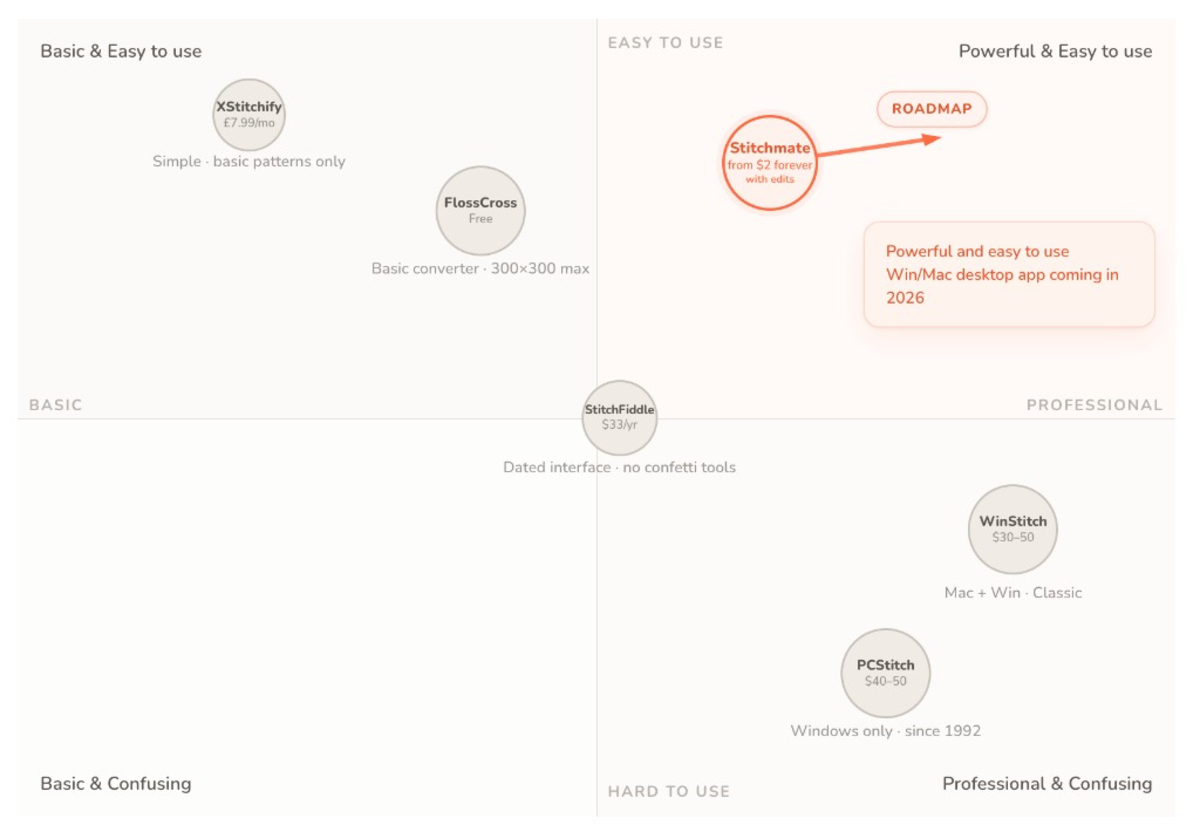
Stitchmate suits stitchers who want a professional editor without the learning curve — browser-based with pattern file import, confetti cleanup, and 50+ thread brands. PCStitch for Windows designers who need specialty stitches. WinStitch for Mac or 30+ thread brands. StitchFiddle for a simple browser workflow. FlossCross when you want fully free, no strings attached. Want the full picture? See all 12 programs reviewed.
Head-to-head comparisons
Choosing between two specific tools? These pages go deeper — features, export quality, and which use cases each wins.
Stitchmate vs WinStitch
Browser vs Mac + Windows desktop
From $2/pattern (packs) vs $30–50 lifetime · 50+ thread brands each
Stitchmate vs PCStitch
Browser (any device) vs Windows-only desktop
From $2/pattern (packs) vs $40–50 lifetime · Confetti cleanup vs none
Stitchmate vs StitchFiddle
Two browser-based pattern makers compared
Pattern Keeper export vs none · FLOW Score vs none
Stitchmate vs FlossCross
Paid features vs completely free
2000×2000 max vs 300×300 · 50+ thread brands vs 2 DMC and Anchor
Stitchmate vs Stitchly
Browser editor vs native iPad app
Any device, 50+ thread brands, file import vs Apple Pencil drawing, offline, one-time purchase
Stitchmate vs Pattern Keeper
Browser progress tracker vs Android PDF tracker
Any device, syncs, tracks backstitch, free · Android only, reads any PDF, ~$9
Stitchmate vs Musely
Full editor vs AI photo-to-chart generator
One-time unlocks vs monthly AI plan · 50+ thread brands vs DMC only
Stitchmate vs KG-Chart
Browser (any device) vs Windows-only charting classic
From $2/pattern (packs) vs $35 one-time · Photo conversion + Pattern Keeper vs hand charting
Why stitchers are switching to Stitchmate
Most cross stitch software was built for a different era. PCStitch hasn't had a major update since Windows 7. WinStitch is powerful but overwhelming for anyone who isn't already fluent in its interface. FlossCross and StitchFiddle are simple but limited — fine for a first pattern, but frustrating when you need blended threads, partial stitches, or more than one thread brand.
Stitchmate is designed to be both. The editor has the depth that professional designers expect — layers, blended threads, French knots, backstitch, partial stitches, and 50+ thread brand catalogs with DMC and Anchor matched using perceptual color science (CIEDE2000). But the interface is clean and fast, built for stitchers who'd rather spend their time designing than fighting software.
Bring your existing patterns
Switching software shouldn't mean starting over. Stitchmate opens .PAT (PCStitch), .OXS (WinStitch/MacStitch), and .XSD (Pattern Maker) files — drag and drop a pattern file and it opens in the editor, ready to edit and re-export. No conversion tools, no file format headaches.
Professional PDF charts you can customize
Every export is Pattern Keeper-compatible by default. Configure your cover page, chart grid, legend layout, and add designer branding. Backstitch, partial stitches, and legend comments all render cleanly. And unlike static exports from other tools — Stitchmate PDFs are linked to editable patterns. Found a color you want to swap after exporting? Open the pattern, change it, and re-export. Your pattern is living, not locked.
Photo conversion that actually produces stitchable patterns
Most converters treat each pixel independently, creating scattered single stitches — stitchers call this "confetti." Stitchmate's converter uses perceptual color matching (CIEDE2000 in OKLCH color space) and spatial-aware quantization to group similar colors into regions you can actually stitch. A built-in FLOW Score (0–100) tells you how stitchable the pattern is before you pick up a needle. Dedicated pixel art mode. Downloadable mockup previews showing your pattern in a frame or hoop.
Remap to any thread brand in one click
Designed a pattern in DMC but your customer prefers Anchor? Select the new brand in the palette panel and Stitchmate remaps every color to the closest perceptual match — instantly. No manual color-by-color swapping. This works across all 50+ supported thread brands.
Works everywhere — desktop app coming 2026
Stitchmate runs in any modern browser on desktop, tablet, or Chromebook. A standalone desktop app for offline editing is shipping in 2026, included free with every Lifetime license.
Flexible pricing — no subscriptions required
A single pattern costs $5.99. Packs bring it down to $2/pattern. Need unlimited access? $14.99 for 30 days — one-time, not recurring. Lifetime is $99. Every option is a one-time purchase, no subscriptions. Compare that to StitchFiddle's $33/year subscription or PCStitch's $50 upfront with no trial editing.
Stitchmate at a glance
- Platform: Browser (any device) + desktop app coming 2026
- Thread brands: 50+ catalogs in editor (DMC, Anchor most accurate)
- Pattern import: .XSD, .OXS, .PAT files (drag & drop)
- Photo conversion: Perceptual color matching, confetti cleanup, FLOW Score, pixel art mode
- PDF export: Pattern Keeper-compatible, configurable, with custom branding
- Stitch types: Full, half, quarter, petite, backstitch, French knots, blended threads
- Layers: Yes
- Pricing: From $2/pattern (10-pack) · $5.99 single · $14.99/30 days · $99 lifetime (all one-time)
Stitchmate is intuitive enough for a first pattern and deep enough that professional sellers use it for their Etsy shops. The interface stays clean at every skill level — beginners see a simple photo converter and editor, while power users access layers, blended threads, thread brand remapping, and configurable PDF export.
Feature & pricing comparison
| Feature | Stitchmate | WinStitch | PCStitch | StitchFiddle | FlossCross | Stitchly |
|---|---|---|---|---|---|---|
| Platform & Access | ||||||
| Platform | Browser (any device) | Windows / Mac | Windows only | Browser | Browser | iOS, Android, Mac (M1+) |
| Runs in browser | ✓ | ✓ | ✓ | |||
| Desktop app | ✓ (coming in 2026 — included with Lifetime) | ✓ | ✓ | Mac (M1+) app | ||
| Free Tier | ✓ | Trial only | Demo (limited) | ✓ | ✓ (full) | ✓ (limited) |
| Pattern files & PDF output | ||||||
| Pattern file import (.XSD, .OXS, .PAT) | ✓ (drag & drop) | ✓ (.OXS) | — (own format only, .pat) | ✓ (.OXS) | ✓ (.OXS) | |
| Thread brand remapping (1-click) | ✓ | ✓ | ||||
| Editable exports (re-open & re-export) | ✓ | ✓ | ✓ | ✓ | ||
| Realistic mockup previews | ✓ (frame/hoop) | ✓ (Framed View) | ||||
| Custom branding on PDF | ✓ | ✓ (Premium) | ✓ (store details) | |||
| Mobile / tablet editing | ✓ (browser) | ✓ (browser) | ✓ (browser) | ✓ (native app) | ||
| Photo Conversion | ||||||
| Photo Import | ✓ | ✓ | ✓ | ✓ | ✓ | ✓ |
| Pixel Art Mode | ✓ | |||||
| FLOW Score | ✓ | |||||
| Confetti Detection | ✓ | |||||
| Confetti Cleanup | ✓ (automatic, adjustable) | Basic (Despeckle) | Basic brush | |||
| Editing Tools | ||||||
| Drawing Tools | ✓ | ✓ | ✓ | ✓ | Basic | ✓ |
| Selection Tools | ✓ | ✓ | ✓ | Limited | Limited | ✓ |
| Layers | ✓ | ✓ (Premium) | Objects only | |||
| Max Pattern Size | 2000 × 2000 | 999 × 999 (300 Lite) | 999 × 999 | 2000 × 2000 | 300 × 300 | 300 × 300 |
| Thread Support | ||||||
| Thread Brands | 50+ (catalog in editor) | 30+ | 40+ | 30+ | 2 DMC and Anchor | 13+ palettes (incl. multiple DMC lines) |
| Thread Conversion | ✓ | ✓ | ✓ | |||
| Stitch Types | ||||||
| Full Cross Stitch | ✓ | ✓ | ✓ | ✓ | ✓ | ✓ |
| Half & Petite Stitch | ✓ | ✓ | ✓ | ✓ | ✓ | ✓ (¼ ½ ¾) |
| Backstitching | ✓ | ✓ | ✓ | ✓ | ✓ | ✓ |
| French Knots | ✓ | ✓ | ✓ | ✓ | ||
| Blended threads (two-strand) | ✓ | ✓ | ✓ | |||
| Specialty Stitches | ✓ | ✓ | ||||
| Export Options | ||||||
| PDF Export | ✓ | ✓ | Print-to-PDF only | ✓ | ✓ (free) | ✓ (full version) |
| Pattern Keeper PDF | ✓ | ✓ (Premium) | ✓ (manual) | ✓ | ||
| Image Export | ✓ (PNG) | ✓ (PNG) | ✓ (PNG) | ✓ (PNG) | ✓ (PNG) | ✓ (PNG, 1:1 print) |
| SVG Export | ✓ (paid) | ✓ (paid) | ✓ (free) | |||
| Stitching | ||||||
| Progress tracker | ✓ (free, any device, syncs, tracks backstitch) | ✓ (row markers) | ✓ (in app) | |||
| Pricing | ||||||
| 1 Pattern | from $2 forever with edits | |||||
| 1 Month | $14.99 (one-time) | $5.50/mo | ||||
| Lifetime | From $99 | $30-50 | $40-50 | Free | from $39.99 (per platform) | |
Stitchmate
- Runs in browser
- ✓
- Desktop app
- 2026 (Lifetime)
- Photo Convert
- ✓
- FLOW Score
- ✓
- Confetti Cleanup
- ✓
- French knots
- ✓
- Pattern Keeper
- ✓
- Thread Brands
- 50+
- Max Size
- 2000×2000
WinStitch
- Platform
- Win/Mac
- Photo Convert
- ✓
- FLOW Score
- —
- Confetti Cleanup
- Basic
- Pattern Keeper
- ✓ (Premium)
- Thread Brands
- 30+
- Max Size
- 999×999
PCStitch
- Platform
- Windows
- Photo Convert
- ✓
- FLOW Score
- —
- Confetti Cleanup
- —
- Pattern Keeper
- ✓ (manual)
- Thread Brands
- 40+
- Max Size
- 999×999
StitchFiddle
- Platform
- Browser
- Photo Convert
- ✓
- FLOW Score
- —
- Confetti Cleanup
- —
- Pattern Keeper
- —
- Thread Brands
- 30+
- Max Size
- 2000×2000
FlossCross
- Platform
- Browser
- Photo Convert
- ✓
- FLOW Score
- —
- Confetti Cleanup
- Basic
- Pattern Keeper
- ✓
- Thread Brands
- 2 DMC and Anchor
- Max Size
- 300×300
Stitchly
- Platform
- iOS, Android, Mac (M1+)
- Photo Convert
- ✓
- FLOW Score
- —
- Confetti Cleanup
- —
- Pattern Keeper
- —
- Thread Brands
- 13+ palettes
- Max Size
- 300×300
Try Stitchmate for your next pattern
See for yourself — open a pattern in the editor.
Use it free; you only pay when you export a PDF.
Which cross stitch software is best for you?
Five cross stitch programs. Different strengths. Here's which one fits your workflow — and why Stitchmate is the one we'd recommend for most stitchers in 2026.
Beginners
New to cross stitch software? Start with Stitchmate's photo converter — upload a photo, adjust colors, and export a pattern. No learning curve. Try the photo converter
Stitchmate
Photo conversion
Converting photos and want clean, stitchable results without tons of confetti? See how Stitchmate converts photos — confetti cleanup, FLOW Score, dedicated pixel art mode, and realistic mockup previews in a frame or hoop. Adjust colors and detail until the pattern looks right, not after you've already started stitching.
Stitchmate
Switching from another tool
Already have patterns in PCStitch (.PAT), WinStitch (.OXS), or Pattern Maker (.XSD)? Stitchmate opens them all — drag and drop, then edit and re-export. No conversion tools needed.
Stitchmate
Use any device, anywhere
Need to work on your phone, tablet, Chromebook, or any computer without installing software? Explore the pattern maker — it runs entirely in your browser with no download required.
Stitchmate or StitchFiddle
Pattern Keeper users
Love stitching with Pattern Keeper on your tablet? You need software that exports compatible PDFs.
Stitchmate or WinStitch
Most thread brands
Need support for obscure thread brands beyond DMC and Anchor? Some software has much broader palette support.
Stitchmate (50+) or WinStitch (30+ brands)
Lowest cost
On a budget but need more than free tiers offer? Desktop software has lower lifetime prices.
WinStitch ($30 lifetime) or PCStitch ($40 lifetime)
Completely free
Need free PDF export with no restrictions? FlossCross is completely free with commercial rights included, though limited to 300×300 and fairly basic.
FlossCross or pic2pat
Windows power users
Long-time Windows user who wants the industry standard desktop app?
WinStitch
Pattern sellers
Selling patterns on Etsy? Import your existing collection (.XSD, .OXS, .PAT), edit in Stitchmate, and export Pattern Keeper-compatible PDFs with custom branding — re-exportable projects you can re-open anytime. See what Stitchmate offers sellers →
Stitchmate
Frequently Asked Questions
What is the best cross stitch software in 2026?
Can Stitchmate open PCStitch, WinStitch, or Pattern Maker pattern files?
Can I edit a pattern after exporting the PDF?
Does Stitchmate work on Chromebook?
What thread brands does Stitchmate support?
Which cross stitch software has the best confetti reduction?
How much does WinStitch cost?
What is the best free cross stitch software?
Is PCStitch better than WinStitch?
What cross stitch software works on Mac?
Which cross stitch software exports Pattern Keeper PDFs?
What is the difference between free and paid cross stitch software?
Which cross stitch program should I use?
It depends on what you need. Here's a quick guide by use case:
For Mac users: Stitchmate, StitchFiddle, and FlossCross run in the browser on Mac and iPad. WinStitch has a native Mac app. PCStitch and KG-Chart are Windows-only.
For beginners on a budget: FlossCross is completely free with Pattern Keeper support. Stitchmate offers a free tier with more advanced tools.
For pattern sellers: Stitchmate and WinStitch both support commercial use. Stitchmate includes Pattern Keeper compatible PDF export by default; PCStitch requires manual font setup for Pattern Keeper compatibility.
For detailed photo conversion: Stitchmate's converter creates accurate colors and considers spatial relationships between stitches, reducing confetti. StitchFiddle, FlossCross and pic2pat offer basic photo import without confetti cleanup. Musely's AI generator is quick and DMC-only, and its chart can't be edited afterward.
Want a deeper breakdown? Read the full 12-program cross stitch software review for detailed feature-by-feature analysis.
Ready to try Stitchmate?
Full pattern editing in your browser — 50+ thread brands, confetti cleanup, Pattern Keeper export. No install. Start free; upgrade when you need exports.
Actively developed — 66 updates in the past year, most recently . See what's new →
Selling patterns on Etsy?
Import your existing collection (.XSD, .OXS, .PAT), edit in Stitchmate, and export Pattern Keeper-compatible PDFs with your own branding.
See what Stitchmate offers sellers →