Progress tracker
The stitch counter that knows your pattern
Mark stitches as you work, highlight one color at a time, and see how many evenings are left. Free, with nothing to install, on your phone, tablet, and laptop. Sign in and your progress follows you between them.
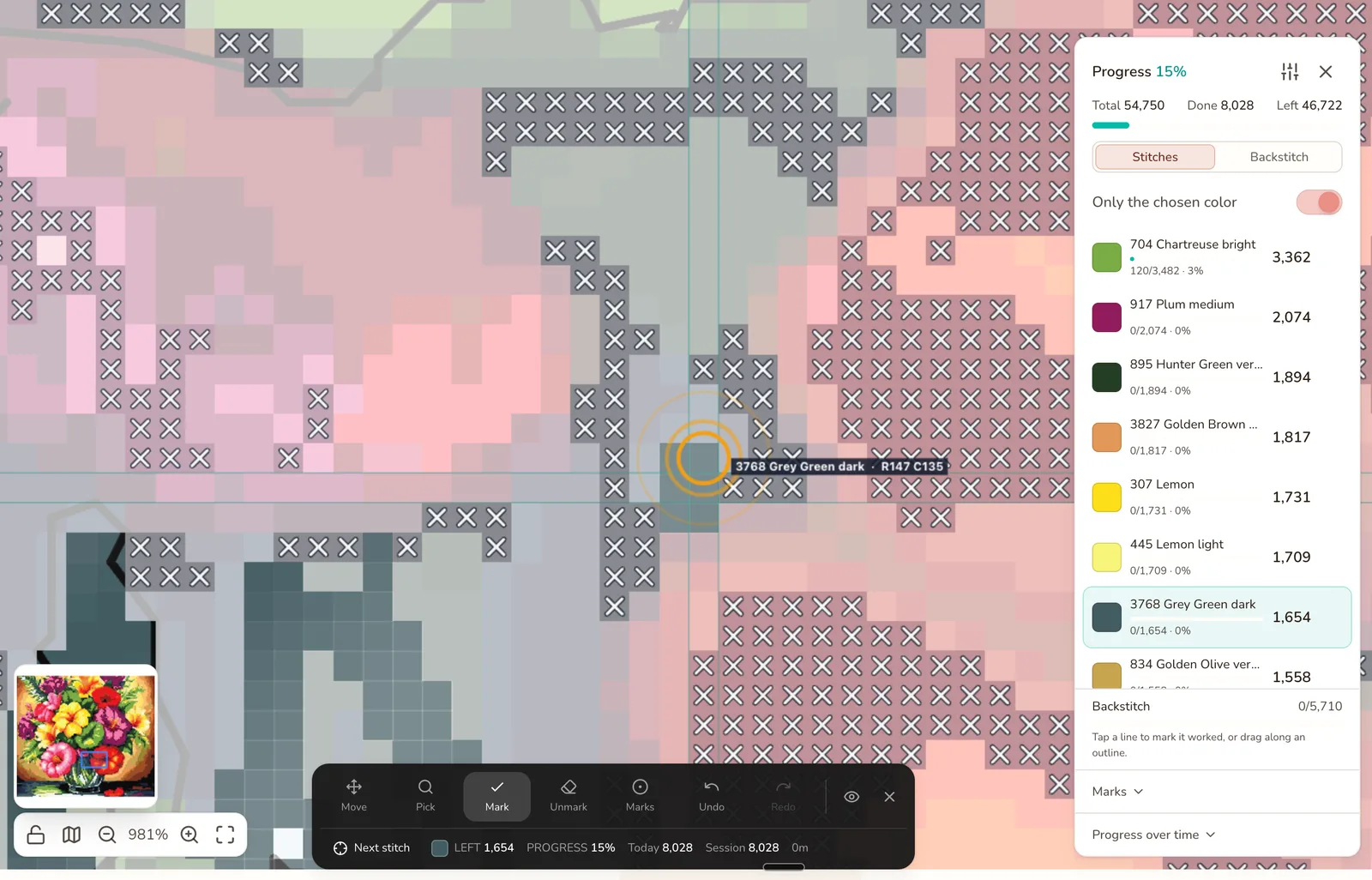
15% in. One color chosen, the rest faded back, and the next stitch ringed at row 147, column 135.
What the progress tracker does
Open any pattern in Stitchmate and press F. The editing tools step aside and the chart becomes a checklist: what's done, what's left, and where you are.
Mark by tap or drag
Tap a stitch, or sweep across a block of the same color. Marked stitches show as crosses. Undo and redo work the way they do everywhere else, and clearing is a separate tool so a stray tap never unmarks your evening.
One color at a time
Pick the thread you have in the needle. Everything else fades back, marking locks to that color, and Next stitch rings the nearest unworked stitch so you never hunt for it. The list shows how many of each color are left.
Park, frog, highlight
Parking marks in any of four corners for the threads you'll come back to. A frog mark on the stitch that needs unpicking. A highlight on the block you're working now. The same marks Pattern Keeper stitchers already use, in the browser.
How many evenings are left
Every mark is timestamped, so the tracker knows your pace. The finish estimate is phrased in evenings at your own speed, never a date. Streaks survive one missed day, and a calendar heatmap shows when you actually stitch.
It tracks the stitches other trackers skip
Backstitch is the part of a chart most trackers pretend isn't there. In Stitchmate it's a target of its own: switch to Backstitch, tap a line, or drag along an outline and every segment you cross is marked. The color list changes to your outline colors, each with its own count, and picking one lights up what's left of it on the chart.
Fractional stitches are handled the same way: a cell holding a quarter and a three-quarter stitch takes one tap per stitch and finishes on the last one, so the count is honest.
The tradeoff: backstitch and fractional tracking are for cross stitch and needlepoint patterns. Diamond painting, fuse beads, and C2C crochet have no outlines to track, so they don't get the target.
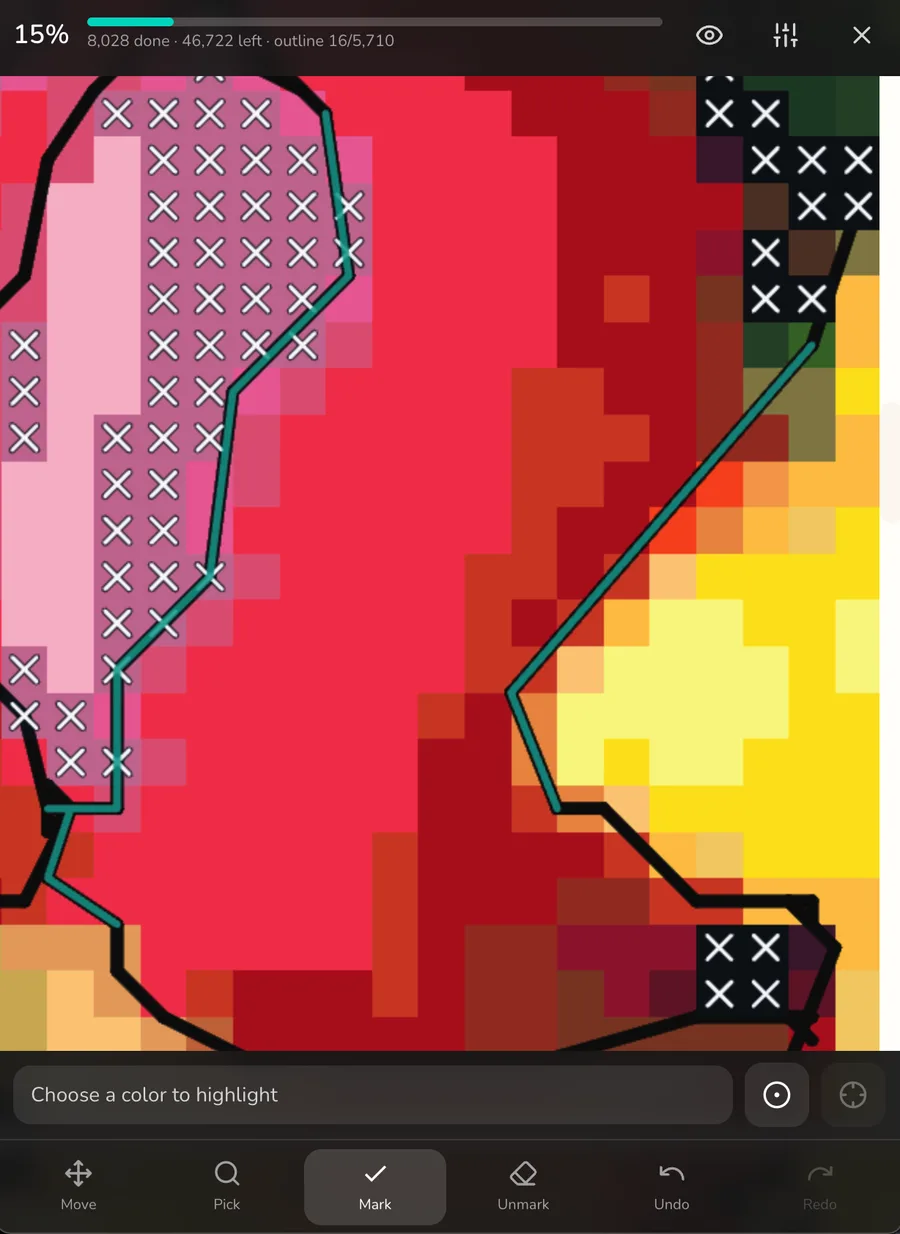
On a phone. Teal is the outline you've worked; 16 of 5,710 segments so far.
It follows you between devices
Every mark is written to your device first, so a tap is never waiting on the network. Sign in and the same progress shows up on your phone, your tablet, and your laptop — stitch from the chart on the big screen at the desk, then pick up on the sofa with the phone. Two devices that both marked stitches merge without losing either session. You can also back progress up to a file and restore it later.
The phone layout is built for one hand: a progress bar and counts at the top, the color picker and tools at the bottom, the chart in between. The screen stays awake while you stitch.
What it doesn't do yet: load a pattern with no connection. Once a session is open, a dropped connection won't lose your marks, but you can't start one offline. That's the one gap on the list.
One tracker, five crafts
The tracker works on every pattern the editor can make. The counts speak the craft's own language: stitches on Aida, drills on adhesive canvas, beads on a pegboard, blocks on a C2C graph.
- Cross stitchFull, fractional, and backstitch tracking.
- NeedlepointTent stitch on canvas, with outline tracking.
- Diamond paintingDrill by drill, color by color. No other tracker does this.
- Fuse beadsBead by bead across every pegboard.
- C2C crochetBlock by block on the graph, alongside the written rows.
Is it a stitch counter?
It counts, but it isn't a tally clicker. A row counter adds one every time you press it. The tracker counts what you've marked against what the pattern contains, so the number it shows is stitches left, per color and overall, and it can't drift the way a clicker does when you forget a press.
Crocheters counting rows on a C2C graph: the graph's row numbers do that job, and the written instructions carry a running row count. The C2C graph guide shows how to read them, and the increase and decrease guide covers the turn.
Bring your own pattern
It tracks anything the editor can open: a chart you converted from a photo , one you drew from scratch, or a pattern file from other software — PCStitch .PAT , WinStitch and MacStitch .OXS , and Pattern Maker .XSD .
A designer's PDF chart drawn with symbols can come in too: PDF import (early access, free with an account) reads the chart and its key and checks the reading against the key's stitch counts, so you know what to compare before you stitch. Scans and PDFs that are only a picture of the chart can't be read yet; for those, Pattern Keeper on Android is still the right tool. The Pattern Keeper comparison lays out which to use when, and how to use both.
Frequently asked questions
Is the progress tracker free?
Yes. The progress tracker is free for every pattern, with no per-pattern unlock and no pass required. Local tracking works without an account; sign in (also free) and your progress syncs across devices.
Do I need an account?
No. Open a pattern and start marking — progress is saved on your device. Signing in adds cross-device sync and a cloud copy, so the phone on the sofa and the laptop at the desk show the same stitches.
Does it work offline?
Not yet. The tracker needs a connection to load the pattern. Once it's open, a dropped connection won't lose your marks — they're written to your device first and synced when you're back online — but you can't cold-start a stitching session on a plane. Offline support is on the list.
Can I track a PDF pattern I bought?
Yes, if the chart is drawn with symbols. PDF import is in early access and free with an account: Stitchmate reads the chart and its key, checks the reading against the key's stitch counts, and you fix any color before you track it. Scans and PDFs that are only a picture of the chart can't be read yet; for those, Pattern Keeper on Android is still the right tool, and our PDFs work in it. See the Pattern Keeper comparison.
Does it track backstitch?
Yes, per segment. Switch the target to Backstitch, then tap a line or drag along an outline to mark it worked. The color list switches to your outline colors with their own counts. Backstitch and fractional-stitch tracking are available for cross stitch and needlepoint patterns.
Is it a stitch counter?
It counts, but it's not a tally clicker. Every stitch you mark is counted against the pattern total, per color and overall, so you always know how many are left. It doesn't count rows for you as you crochet — for that, the C2C graph's row numbers and the written rows do the counting.
Can I use the Stitchmate tracker and Pattern Keeper together?
Yes. Every paid plan exports a Pattern Keeper compatible PDF, so you can design or convert here, track here on your laptop and phone, and hand the same chart to Pattern Keeper on an Android tablet. Before you download we tell you exactly which backstitch and partial stitches Pattern Keeper won't show.
Open a pattern and start marking
Free on every pattern. No account needed to track; sign in to sync.