Stitchmate vs PCStitch
PCStitch has been the go-to Windows cross-stitch software for over 20 years. Stitchmate is a modern alternative that matches PCStitch's core stitching — French knots, blended threads, backstitch — and adds layers, 50+ thread brands, native PDF export, plus quality analysis tools PCStitch doesn't have. Already have PCStitch patterns? Stitchmate imports .PAT files directly — drag, drop, keep editing.
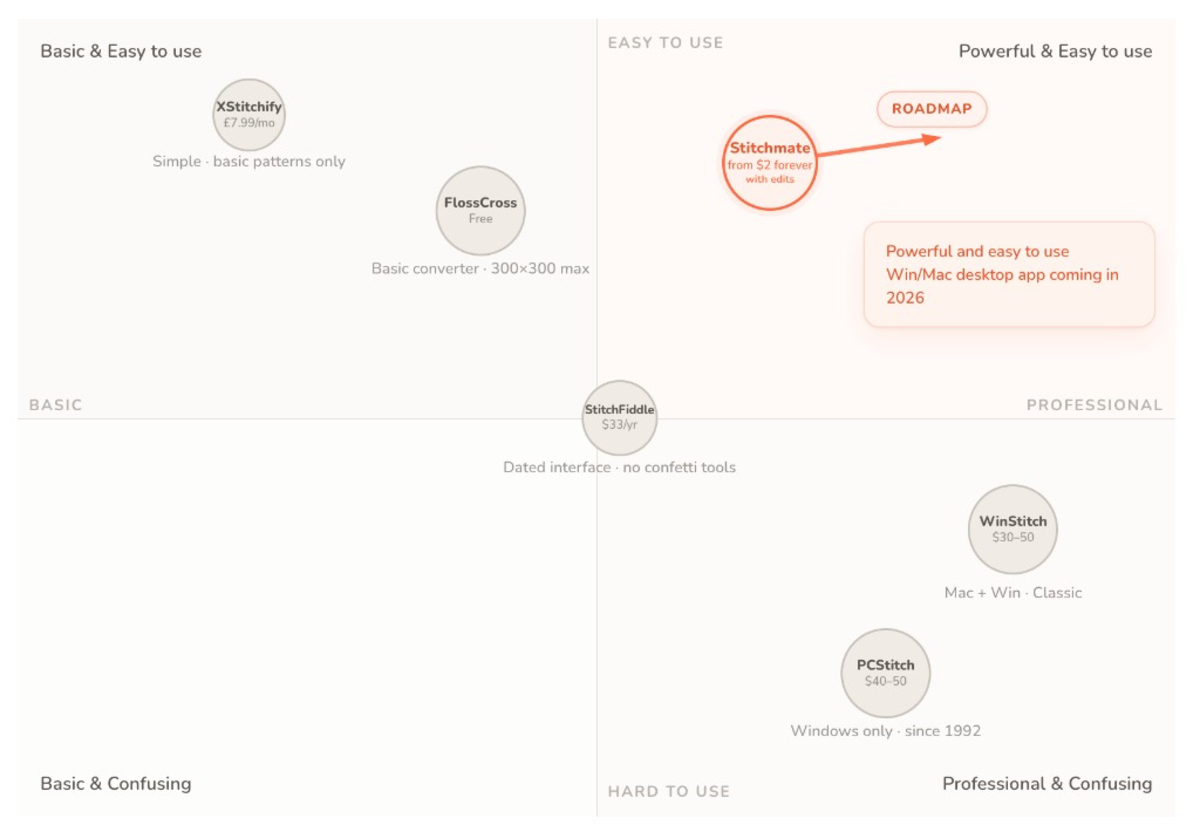
The short version
Don't have time for a deep dive? Here's the quick take.
Choose PCStitch if you...
- Need 60+ specialty stitches (Hardanger, Rhodes, beads, buttons)
- Use Windows exclusively and prefer desktop software
- Want 60+ specialty stitches for advanced counted thread techniques
- Prefer a one-time purchase at $40–50
Choose Stitchmate if you...
- Want to import existing PCStitch .PAT files and keep editing
- Use Mac, Chromebook, iPad, or multiple devices
- Want FLOW score and confetti cleanup to ensure stitchable patterns
- Want French knots + blended threads with 50+ thread brands
- Want one-click Pattern Keeper export (no manual setup)
Platform & access
| Feature | Stitchmate | PCStitch |
|---|---|---|
| Platform | Any browser (Windows, Mac, Linux, Chrome OS, iPad) | Windows only |
| Download required | No | Yes |
| .PAT file import | ✓ (drag & drop PCStitch files) | Native format |
| Free tier | ✓ (full editor, PNG export) | Demo only (cannot save) |
| Last updated | 2026 | ~2016 |
| Offline use | — | ✓ |
| Progress tracking while stitching | ✓ Free progress tracker on any device, syncs, tracks backstitch | — (print the chart, or export for Pattern Keeper) |
Photo conversion
Stitchmate offers quality analysis tools to predict how a pattern will feel to stitch. PCStitch's import wizard provides cropping, background erasure, and foreground priority controls.
| Feature | Stitchmate | PCStitch |
|---|---|---|
| Photo import | ✓ | ✓ |
| Pixel art mode | ✓ (1:1 color preservation) | — |
| Dithering options | ✓ | Smooth resize only (no algorithm choice) |
| FLOW score | ✓ | — |
| Confetti detection | ✓ | — |
| Confetti cleanup | ✓ (automatic, adjustable, global or brush) | — |
| Similar color warnings | ✓ | — |
Thread support
Stitchmate includes 50+ thread brand catalogs. PCStitch ships with DMC, Anchor, Weeks Dye Works, Kreinik, and others, plus a Floss Editor for creating custom lists. Stitchmate adds one-click brand remapping across the entire pattern.
| Feature | Stitchmate | PCStitch |
|---|---|---|
| Thread brands | 50+ (DMC, Anchor, Cosmo, Madeira, hand-dyed, and more) | 10+ (DMC, Anchor, Weeks, Kreinik, etc.) + custom via Floss Editor |
| Hand-dyed threads | ✓ (Weeks Dye Works, Gentle Art, and more) | ✓ (Weeks, Gentle Art, etc.) |
| Thread conversion | ✓ (1-click brand remapping across all 50+ brands) | ✓ |
| Blended threads | ✓ (2–4 strands, across all 50+ brands) | ✓ |
Stitch types
Both support the stitch types most patterns use. PCStitch goes further with 60+ specialty stitches that Stitchmate doesn't have.
| Feature | Stitchmate | PCStitch |
|---|---|---|
| Full cross stitch | ✓ | ✓ |
| Half / quarter / three-quarter | ✓ | ✓ |
| Backstitching | ✓ | ✓ |
| French knots | ✓ | ✓ |
| Blended threads | ✓ (2–4 strands, across all 50+ brands) | ✓ |
| Specialty stitches | — | ✓ (60+ including Hardanger, Rhodes) |
| Beads | — | ✓ |
Editing tools
| Feature | Stitchmate | PCStitch |
|---|---|---|
| Drawing tools | ✓ | ✓ |
| Selection tools | Rect, lasso, magic wand | Rect only |
| Layers | ✓ | Objects only (no layer stack) |
| Unlimited undo | ✓ | 10 levels |
| Max pattern size | 2000 × 2000 | 999 × 999 |
Export options
Stitchmate has native PDF export with one-click Pattern Keeper compatibility. PCStitch has no built-in PDF export — users print to a third-party PDF printer and need specific symbol fonts for Pattern Keeper compatibility.
| Feature | Stitchmate | PCStitch |
|---|---|---|
| PDF export | ✓ (paid plans) | No native PDF (print-to-PDF via third-party) |
| Pattern Keeper compatible | ✓ (one-click, all paid plans) | ✓ (manual: specific fonts + third-party PDF printer) |
| SVG export | ✓ (paid plans) | — |
| Realistic mockup previews | ✓ (frame/hoop) | — |
| Custom branding on PDF | ✓ | — |
| Thread shopping list | ✓ | ✓ |
Pricing
PCStitch offers lower upfront costs ($40–50 one-time). Stitchmate offers flexible one-time options from $5.99/pattern to $99–149 lifetime — all including future updates.
| Option | Stitchmate | PCStitch |
|---|---|---|
| Free tier | ✓ (PNG only, no PDF) | Demo only (cannot save) |
| 1 pattern | $5.99 (PDF unlock forever, with edits) | — |
| Standard / 30 days | $14.99 for 30 days (one-time, not a subscription) | $39.95 (one-time) |
| Pro / lifetime | $99–$149 (includes all future updates) | $49.95 (one-time) |
| Updates included | ✓ All plans | Paid upgrades for major versions |
How they compare in practice
Feature lists tell part of the story. The other part is how the software feels in your hands.
PCStitch has accumulated two decades of features. It can do things Stitchmate can't — 60+ specialty stitches including Hardanger, Rhodes, and beads. If you need those capabilities, PCStitch is your choice. But the interface hasn't fundamentally changed since the mid-2000s, Pattern Keeper requires manual setup, and you're locked to Windows.
Stitchmate now matches PCStitch on the stitch types most stitchers use daily — French knots, blended threads, backstitch — and goes further with 50+ thread brands, a true layer system, native PDF export, and quality analysis tools PCStitch doesn't have. FLOW scoring tells you how stitchable your pattern is before you start, and automatic confetti cleanup handles the scattered stitches that PCStitch's converter creates but can't detect. The tradeoff is real — no Hardanger, no beads — but for photo conversion and standard cross stitch, the quality tools make a noticeable difference.
Neither approach is wrong. PCStitch suits power users who need maximum specialty stitch variety. Stitchmate suits those who want a modern workflow with quality assurance built in.
The bottom line
PCStitch is the right choice if you use Windows exclusively, need 60+ specialty stitches (Hardanger, beads, Rhodes), or want the deepest stitch variety available. At $40–50 one-time, it's a competitive price for desktop software. The tradeoff: Windows-only, no native PDF export, no layer system, Pattern Keeper requires manual setup, and the interface shows its age.
Stitchmate is the right choice if you work across devices (Mac, Chromebook, iPad), want one-click Pattern Keeper export, or need FLOW score and confetti cleanup to ensure your patterns are enjoyable to stitch. With 50+ thread brands, French knots, blended threads, layers, and native PDF export — plus the ability to import your existing .PAT files — switching doesn't mean starting over.
For pattern sellers: Stitchmate's commercial plans ($149 lifetime) include Pattern Keeper export, custom PDF branding, and realistic mockup previews. PCStitch Pro ($49.95) is cheaper upfront but has no native PDF export, no custom branding, and no mockups.
Used Stitchmate? Tell others how it went.
The best way to compare? Try both.
PCStitch offers a demo (can't save work). Stitchmate is free to start with PNG export. Open them side by side and see which workflow fits you better.
Works on any device — phone, tablet, or computer. No Windows required.
All comparisons · All features · 12-program review · Open .PAT files online · Photo converter · What is confetti? · DMC color chart · vs WinStitch · vs Stitchly · vs KG-Chart
Actively developed — 66 updates in the past year, most recently . See what's new →
Frequently Asked Questions
What's the difference between Stitchmate and PCStitch?
Stitchmate is a browser-based cross-stitch pattern maker that works on any device, while PCStitch is a Windows-only desktop application. Both support French knots, blended threads, backstitch, and extensive thread libraries (Stitchmate has 50+, PCStitch has 10+). Stitchmate adds layers, FLOW score, confetti cleanup, native PDF export with Pattern Keeper compatibility, and can import PCStitch .PAT files directly. PCStitch offers 60+ specialty stitches (Hardanger, Rhodes, beads) that Stitchmate doesn't have, but has no native PDF export and no layer system.
Is Stitchmate a good alternative to PCStitch?
Yes. Stitchmate matches PCStitch on core features — French knots, blended threads, backstitch — and goes further with layers, 50+ thread brands, native PDF export, and quality analysis tools (FLOW score, confetti cleanup) with one-click Pattern Keeper export. If you use Mac, Chromebook, or iPad, Stitchmate works on any device. PCStitch remains better for 60+ specialty stitches (Hardanger, beads, Rhodes).
Can I import my PCStitch patterns into Stitchmate?
Yes. Stitchmate opens .PAT files (PCStitch format) directly — drag and drop into the editor. Colors, stitches, and backstitch transfer intact. You can then edit, re-export as a Pattern Keeper PDF, or remap to a different thread brand.
Does PCStitch work with Pattern Keeper?
Yes, but it requires manual setup — specific symbol fonts (PCStitch Symbols or PCStitch Symbols 2) and a third-party PDF printer like PDF Creator. Stitchmate offers one-click Pattern Keeper export with no additional configuration.
Which is cheaper, Stitchmate or PCStitch?
PCStitch offers one-time purchases: Standard at $39.95 and Pro at $49.95. Stitchmate offers a free tier (full editor, PNG export), $5.99 single-pattern PDF unlock (forever, with unlimited edits), or lifetime from $99 with all updates included. For a single purchase, PCStitch Pro is cheaper upfront. Stitchmate's lifetime includes all future updates.
Which is better for needlepoint, Stitchmate or PCStitch?
They serve different needs. PCStitch's 60+ specialty stitch types (Rhodes, Hardanger, beads) suit advanced counted-thread embroidery on fabric, but it has no needlepoint mode — no tent stitch rendering, no mesh-count sizing, no wool brands. Stitchmate charts needlepoint natively: tent and petite stitches on a canvas grid, mesh sizing from 10 to 28, and Appleton wool in the thread library. Neither charts decorative canvaswork stitches like nobuko or scotch — no living software does.