Stitchmate vs WinStitch
WinStitch has 28 years of feature depth behind it. Stitchmate is a modern alternative with the same core
capabilities — French knots, blended threads, 50+ thread brands, layers, backstitch
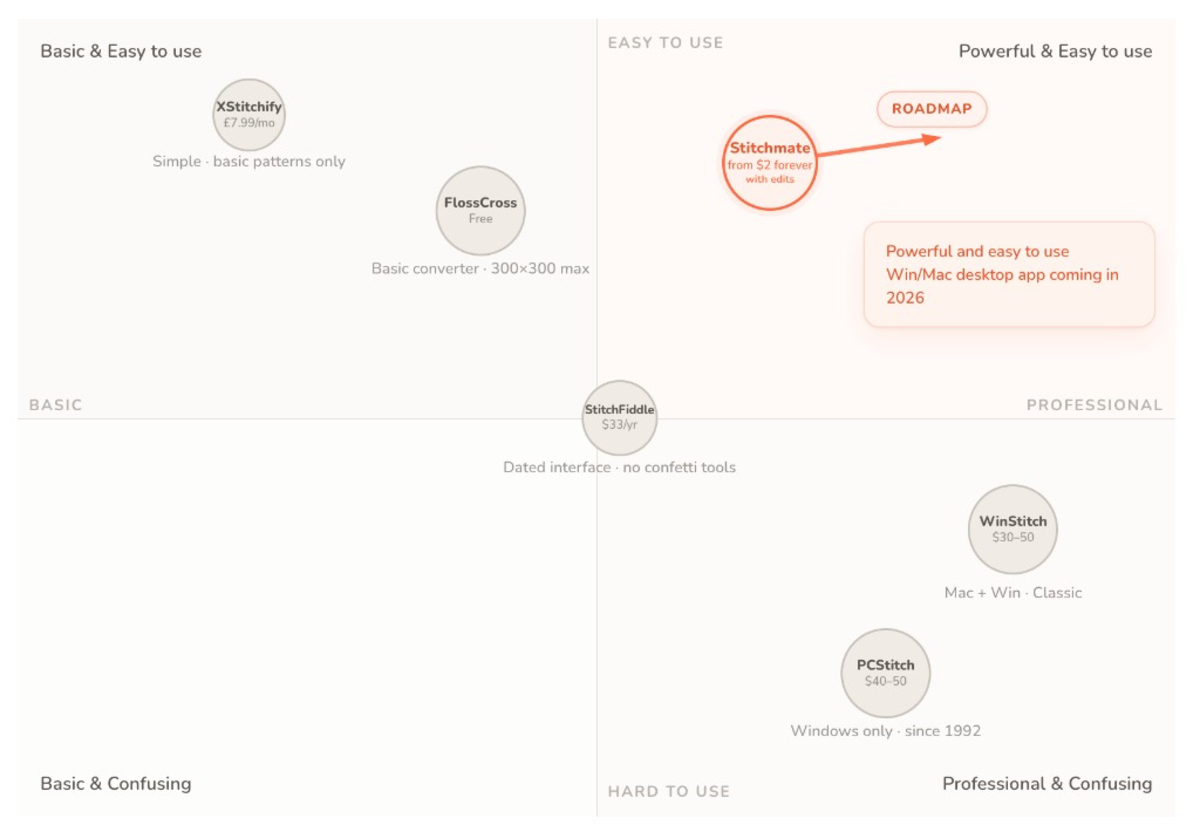
The short version
Don't have time for a deep dive? Here's the quick take.
Choose WinStitch if you...
- Need specialty stitches like Hardanger, chain stitch, beads, or buttons/sequins
- Have custom thread sets you've built over years
- Need crochet or Tunisian pattern export
- Need TrueType text layers for lettering
- Prefer a one-time purchase starting at $30
Choose Stitchmate if you...
- Want to import existing WinStitch .OXS files and keep editing
- Want to work on any device without installing software
- Want FLOW score and confetti cleanup to ensure stitchable patterns
- Want French knots + blended threads with 50+ thread brand catalogs
- Want Pattern Keeper export included in all paid plans
Platform & access
| Feature | Stitchmate | WinStitch |
|---|---|---|
| Platform | Any browser (Windows, Mac, Linux, Chrome OS, iPad) | Windows & Mac (desktop app) |
| Download required | No | Yes |
| Mobile / tablet | ✓ | — |
| .OXS file import | ✓ (drag & drop WinStitch files) | Native format |
| Free tier | ✓ (PNG export, full editor) | Demo only (cannot save) |
| Last updated | 2026 | 2025 |
| Development history | New | 28+ years |
| Progress tracking while stitching | ✓ Free progress tracker on any device, syncs, tracks backstitch | — (export for Pattern Keeper) |
Photo conversion
Stitchmate offers quality analysis tools to predict how a pattern will feel to stitch. WinStitch offers blend creation during import and the ability to overlay your source image behind the grid while editing — useful for manual tracing.
| Feature | Stitchmate | WinStitch |
|---|---|---|
| Photo import | ✓ | ✓ |
| Pixel art mode | ✓ (1:1 color preservation) | — |
| FLOW score | ✓ | — |
| Confetti detection | ✓ | — |
| Confetti cleanup | ✓ (automatic, adjustable strength, global or brush-targeted) | Basic (Despeckle) |
| Similar color warnings | ✓ | — |
| Automatic blend creation | — | ✓ |
| Onion skin (overlay image while editing) | ✓ | ✓ (Standard/Premium) |
Thread support
Both offer extensive thread libraries. Stitchmate includes 50+ brand catalogs with perceptual color matching (CIEDE2000). WinStitch has 30+ brands plus custom thread set support — an advantage if you've built your own palettes over the years.
| Feature | Stitchmate | WinStitch |
|---|---|---|
| Thread brands | 50+ (DMC, Anchor, Cosmo, Madeira, and more) | 30+ brands |
| Hand-dyed threads | ✓ (Weeks Dye Works, Gentle Art, and more) | ✓ (Weeks, Gentle Arts, Dinky Dyes, etc.) |
| Thread conversion | ✓ (1-click brand remapping across all 50+ brands) | ✓ |
| Custom thread sets | — | ✓ |
Editing tools
| Feature | Stitchmate | WinStitch |
|---|---|---|
| Drawing tools | ✓ | ✓ |
| Selection tools | Rect, lasso, magic wand | Rect, lasso |
| Layers | ✓ (all plans) | ✓ (Premium only) |
| Text tool | ✓ (cross stitch fonts) | ✓ (any TrueType font, all editions) |
| Image layers | — | ✓ (Premium only) |
| Symmetry modes | ✓ | ✓ |
| Unlimited undo | ✓ | ✓ |
| Max pattern size | 2000 × 2000 | 999 × 999 (300 × 300 Lite) |
Stitch types
Both support the stitch types most patterns use — full, half, quarter, backstitch, and French knots. WinStitch goes further with specialty stitches (Hardanger, chain stitch, beads) that Stitchmate doesn't have.
| Feature | Stitchmate | WinStitch |
|---|---|---|
| Full cross stitch | ✓ | ✓ |
| Half stitch | ✓ | ✓ |
| Quarter stitch | ✓ | ✓ (Standard/Premium) |
| Three-quarter stitch | ✓ | ✓ |
| Petite stitch | ✓ | ✓ |
| Backstitching | ✓ | ✓ |
| French knots | ✓ | ✓ (Standard/Premium) |
| Blended threads | ✓ (2–4 strands, across all 50+ brands) | ✓ (across 30+ built-in brands + custom sets) |
| Beads | — | ✓ (Standard/Premium, multiple sizes) |
| Specialty stitches | — | ✓ (Premium: Hardanger, chain, diamond, etc.) |
| Buttons / sequins | — | ✓ (Premium) |
Export options
Stitchmate includes Pattern Keeper compatibility in all paid plans (from $5.99 per pattern). WinStitch requires Premium (~$50) for the one-click Pattern Keeper export.
| Feature | Stitchmate | WinStitch |
|---|---|---|
| PDF export | ✓ (paid plans) | ✓ (all editions, advanced in Premium) |
| Pattern Keeper compatible | ✓ (all paid plans) | ✓ (Premium only: one-click export) |
| PNG / image export | ✓ | ✓ |
| SVG export | ✓ (paid plans) | — |
| Realistic mockup previews | ✓ (frame/hoop) | ✓ |
| Thread shopping list | ✓ | ✓ |
| Custom branding on PDF | ✓ | ✓ (Premium) |
| Colorways (alternate palettes) | — | ✓ |
| Crochet / Tunisian export | ✓ C2C crochet only — no Tunisian | ✓ |
Pricing
WinStitch offers lower upfront costs ($30–50) but charges for yearly upgrades. Stitchmate offers non-renewing one-time access — pay once, keep the features for the duration you choose, including all updates.
| Option | Stitchmate | WinStitch |
|---|---|---|
| Free tier | ✓ (PNG only, no PDF) | Demo only (cannot save) |
| 1 pattern | $5.99 (PDF unlock forever, with edits) | — |
| 1 month | $14.99 (one-time, not a subscription) | — |
| Lifetime (Hobby) | $99 | ~$40 (999×999, no layers, no PK) |
| Lifetime (Pro) | $149 | ~$50 (layers + Pattern Keeper) |
| Yearly upgrades | Included in all plans, including Free | Optional paid upgrades |
How they compare in practice
Feature lists tell part of the story. The other part is how the software feels in your hands.
WinStitch is mature and capable. With 28 years of development, it's packed with features — layers, custom thread sets, specialty stitches, crochet export. The interface reflects that depth: powerful but dense, with menus and options for workflows you may never use. It's designed for users who need everything.
Stitchmate takes a different approach. Instead of exposing every option, it surfaces the ones that matter most for the current task — and adds analysis tools WinStitch doesn't have. FLOW scoring catches stitchability problems before you commit to a project, and automatic confetti cleanup handles the scattered stitches that make photo conversions tedious. The result is fewer niche features, but more confidence in the patterns you produce.
Neither approach is wrong. WinStitch suits power users who need maximum flexibility. Stitchmate suits those who want a streamlined workflow with quality assurance built in.
Craft scope: WinStitch reaches sideways into knitting and crochet chart export, and MacStitch has long been the charting tool of choice among professional needlepoint designers. Stitchmate goes deeper on the counted-thread side instead: a dedicated needlepoint mode renders charts as true tent stitches with mesh-count presets and wool thread brands — where MacStitch reaches the same result through a "plastic canvas / tapestry" chart type, with no mesh presets and needlepoint terminology nowhere in sight. A diamond painting mode rounds out the set with round/square drills, DMC drill codes, and true-size canvas math — a craft neither WinStitch nor MacStitch touches. How the two compare against the rest of the needlepoint field is covered in the needlepoint chart software review.
Thread colors: Stitchmate's color values were sampled directly from scanned official thread catalog cards — the same reference cards manufacturers provide to retailers. When you see DMC 3371 on screen, it matches what you'll see in your hand. Color accuracy varies across pattern software, and small differences compound across a 50-color palette.
PDF symbols: Every symbol in Stitchmate's PDF export was selected and tested for legibility at print size. Similar-looking symbols are spaced apart in the assignment order. The goal: a printed chart you can actually read without squinting or second-guessing whether that's a circle or a dot.
These aren't headline features. They're the kind of details you only notice when they're missing.
The bottom line
WinStitch is the right choice if you need specialty stitches (Hardanger, beads, chain stitch), custom thread sets you've built over the years, or crochet/Tunisian export. The software has 28 years of feature depth behind it. Starting at $30 (Lite) and $50 (Premium), it's competitively priced for desktop software. The tradeoff: you're tied to a specific computer, and yearly upgrades cost extra.
Stitchmate is the right choice if you want to work anywhere without installing software, want quality analysis tools (FLOW score, confetti cleanup) to ensure your patterns are enjoyable to stitch, or want Pattern Keeper compatibility without paying for the premium tier. With 50+ thread brands, French knots, blended threads, and layers — plus the ability to import your existing .OXS files — switching doesn't mean starting over.
For pattern sellers: Both work. WinStitch Premium ($50) or Stitchmate Pro ($149 lifetime) include Pattern Keeper compatibility and commercial rights. WinStitch offers custom thread sets; Stitchmate offers quality scoring and custom PDF branding.
For hobbyists :
Looking for a WinStitch alternative? If you're on Mac, iPad, Chromebook, or just want browser-based access without a desktop install, Stitchmate handles the same core workflows — and you can bring your existing .OXS patterns with you.
Used Stitchmate? Tell others how it went.
The best way to compare? Try both.
WinStitch offers a free demo (can't save work). Stitchmate is free to start with PNG export. Open them side by side and see which workflow fits you better.
Works on any device — phone, tablet, or computer. No desktop software required.
All comparisons · All features · 12-program review · Open .OXS files online · Photo converter · What is confetti? · DMC color chart · vs PCStitch · vs Stitchly · vs KG-Chart
Actively developed — 66 updates in the past year, most recently . See what's new →
Frequently Asked Questions
What's the difference between Stitchmate and WinStitch?
Stitchmate is browser-based and works on any device, while WinStitch is a desktop app for Windows and Mac. Both support French knots, blended threads, layers, backstitch, and Pattern Keeper PDF export. Stitchmate has 50+ thread brand catalogs, FLOW score quality analysis, confetti cleanup, and can import WinStitch .OXS files directly. WinStitch has specialty stitches (Hardanger, beads), custom thread sets, and crochet/Tunisian export.
Is Stitchmate or WinStitch better for Pattern Keeper?
Both export Pattern Keeper compatible PDFs. WinStitch requires the Premium tier (~$50) for one-click Pattern Keeper export. Stitchmate includes Pattern Keeper compatibility in all paid plans — from $5.99 for a single pattern to $99 lifetime.
Which has more thread brands, Stitchmate or WinStitch?
Both offer extensive thread libraries. Stitchmate includes 50+ brand catalogs in the editor — DMC, Anchor, Cosmo, Madeira, plus hand-dyed brands like Weeks Dye Works and Gentle Art — with colors matched using perceptual color science (CIEDE2000). WinStitch supports 30+ brands and adds custom thread set support, so you can define your own thread palettes.
Can I import my WinStitch patterns into Stitchmate?
Yes. Stitchmate opens .OXS files (WinStitch/MacStitch format) directly — drag and drop into the editor. Colors, full and partial stitches, backstitch, and thread palettes all transfer intact. You can then edit, re-export as a Pattern Keeper PDF, or remap to a different thread brand. Custom thread sets, TrueType text layers, and specialty stitches like Hardanger or beads are not imported since Stitchmate doesn't support those features.
Does Stitchmate support French knots and blended threads?
Yes. French knots are fully supported in the editor, PDF export, and file imports. The realistic renderer shows them with proper 3D lighting. Blended (multi-thread) colors — 2 to 4 strand mixing — are also supported, with blend info carrying through to PDF export.
Is WinStitch still being updated?
Yes, WinStitch is actively maintained with yearly updates (current version is 2025). Ursa Software has been developing it for 28+ years. Stitchmate is also actively developed with frequent feature releases.
Is WinStitch or Stitchmate better for needlepoint?
MacStitch/WinStitch is the tool many professional needlepoint designers have historically used, and it handles tent-stitch charting well — though its needlepoint support is essentially cross-stitch charting worn sideways, and the interface shows its age. Stitchmate has a dedicated needlepoint mode: charts render as true tent stitches on a canvas grid, sizing works in mesh count (10–28), petite stitches handle fine detail, and the thread library includes all 430 Appleton wool shades. Neither tool charts decorative stitches like nobuko or scotch — that remains hand-diagram territory in both.
Which is cheaper, Stitchmate or WinStitch?
WinStitch has lower entry pricing: Lite at ~$30, Premium at ~$50. Yearly upgrades cost extra. Stitchmate offers flexible one-time (non-renewing) options: $5.99 for a single pattern PDF (forever, with unlimited edits and re-exports), $14.99 for 30 days, or $99–$149 lifetime — all including future updates.