8 Needlepoint Chart Programs Reviewed (2026) — Honest Pros & Cons
Most of these are cross stitch tools wearing a needlepoint hat. Here's which ones actually fit.
The short answer: almost every program that comes up when you search "needlepoint design software" is cross stitch software. It'll draw a grid and match colors to cotton floss, and it will happily let you pretend each square is a tent stitch — but it won't know what 18 mesh is, won't show you a diagonal stitch, and won't carry a single skein of wool in its thread library.
That's changing. In 2026 there are two programs built needlepoint-first, one venerable desktop suite with genuine tapestry support, and five cross stitch tools that needlepointers borrow anyway. This guide covers all eight — what each one actually does for needlepoint, what it costs, and where it falls over.
Last updated September 2026. Stitchly, Stitch Fiddle, FlossCross, PCStitch, and WinStitch details re-checked on their own sites in September 2026; other prices checked August 2026.
Direct answer — best needlepoint chart software in 2026
Stitchmate (free to start, browser) is the only browser tool with a native needlepoint mode and wool thread libraries — tent stitch rendering, 10–28 mesh, Appleton wool. StitchAlot Studio ($34.99, desktop/tablet) is needlepoint-first with a clever true-size canvas export, but ships zero wool threads. WinStitch / MacStitch ($47 + tax) is the deepest desktop editor with Appleton support, and it takes time to learn. Everything else here is cross stitch software you'd be adapting, though Stitchly now carries Appletons wool.
Below: all 8 programs compared on the three things that make software needlepoint-ready — wool threads, tent stitch rendering, and mesh sizing.
What makes software needlepoint-ready?
A counted needlepoint chart and a cross stitch chart look nearly identical on paper — a grid of colored squares or symbols. So why does the software matter? Three tests separate a real needlepoint tool from a cross stitch tool with the labels swapped:
1. Does it render tent stitches? A needlepoint stitch is a single diagonal over one canvas intersection, not an X. A tool that previews your design in crosses is showing you a texture you'll never stitch. Tent stitch rendering — one diagonal per cell — is the visual tell that the software knows what craft it's serving.
2. Does it size by mesh? Needlepoint canvas is measured in mesh — canvas threads per inch — with 13 and 18 mesh the common sizes (10 for rugs, 24 for miniatures). A needlepoint-ready tool asks for your mesh and computes the finished size from it. A cross stitch tool asks about Aida and fabric, and leaves the arithmetic to you. (The numbers do line up for sizing — more in our mesh count guide.)
3. Does it carry wool? This is the big one, and half the programs here fail it outright. Needlepoint is stitched in wool and silk — Appleton, Silk & Ivory, Vineyard Silk, Pepper Pot — not six-strand cotton floss. If the thread library is DMC-only, every color match in your chart points at a skein you won't be buying. More on this below, because the results across these eight programs are genuinely surprising.
One more thing worth saying up front: charted needlepoint is the affordable, design-your-own corner of a craft where most people stitch painted canvases — and that's a feature, not a competition. If you love painted canvas, nothing here replaces it. This guide is for when you want to chart your own: a monogram, a photo of your dog, a stocking, a geometric.
Best needlepoint software by category — our top picks
Quick disclosure: Stitchmate (stitchmate.app) is our own tool, so read that entry knowing who wrote it. We've kept the downsides honest for everyone, including us.
- Best overall for charted needlepoint: Stitchmate — the only browser tool with both a native needlepoint mode and wool thread libraries. Free to start.
- Best offline / native app: StitchAlot Studio — needlepoint-first design on Windows, Mac, iPad, and Android at $34.99. Bring your own wool conversions. (Stitchmate's lifetime pass includes an offline desktop app too, but for Mac and Windows only.)
- Most powerful desktop editor: WinStitch / MacStitch — $47 + tax, over 30 years of development, Appleton wool, tent stitch view. Steep learning curve.
- Best on iPad with Apple Pencil: Stitchly — $75 (often $39.99), the nicest drawing experience here, with Appletons wool and a Half Cross setting, though needlepoint is a documented workaround rather than a built-in mode.
- Best free options: Stitchmate's editor (free to design, pay for PDF) or Stitch Fiddle / FlossCross if you're happy adapting a cross stitch grid yourself.
Quick comparison table
Every program reviewed, scored on the three needlepoint-ready tests plus the basics:
| Tool | Price | Platform | Tent stitch view | Mesh sizing | Wool threads | Best for |
|---|---|---|---|---|---|---|
| Stitchmate | Free to start, PDF from $7.99 | Any browser; Mac + Windows app with a lifetime pass | ✅ Native needlepoint mode | ✅ 10–28 mesh presets | ✅ Appleton + silk/fiber lines | Charted needlepoint, photo conversion |
| StitchAlot Studio | $34.99 one-time (launch price) | Windows, Mac, iPad, Android | ✅ 3D tent stitch preview | ✅ 7–24 mesh presets | ❌ DMC/Anchor/Kreinik only | Offline native app, true-size printing |
| WinStitch / MacStitch | $47 + tax one-time (Premium) | Windows + Mac | ✅ Tapestry chart type | ⚠️ Free HPI, no presets | ✅ Appleton Tapestry, Needloft | Power users, deep PDF control |
| PCStitch 11 | $49.95 one-time | Windows only | ❌ Half stitches only | ❌ Cloth count | ❌ None | Cross stitch on Windows |
| Stitchly | $75 one-time (often $39.99) | iPhone, iPad, Mac (M1+), Android | ⚠️ Half Cross setting, not a mode | ⚠️ 1:1 canvas export, no mesh presets | ✅ Appletons, DMC Tapestry Wool, Pepper Pot | Apple Pencil drawing |
| Stitch Fiddle | Free / $33/yr | Any browser | ❌ Cross stitch grid | ❌ | ⚠️ DMC Tapestry Wool among ~50 lines | Free grid design, DIY adaptation |
| FlossCross | Free | Any browser | ❌ Cross stitch grid | ❌ | ❌ DMC + Anchor floss only | Completely free, DMC/Anchor grids |
| StitchSketch | $7.99 | Win, Mac, iOS, Android | ❌ No needlepoint craft type | ❌ | ❌ None | Multi-craft grids (not needlepoint) |
The wool thread problem
Here's the finding that surprised us most while researching this guide: of eight programs needlepointers actually use, four carry zero wool threads. Not a reduced range — zero.
The pattern software world grew up around cross stitch, so every thread library started with DMC cotton and grew sideways into more cotton. Wool palettes arrived late, if at all. The result:
- No wool at all: PCStitch, FlossCross, StitchSketch — and, remarkably, StitchAlot Studio, whose homepage leads with needlepoint but whose entire library is DMC, Anchor, and Kreinik cotton and metallics (994 colors total).
- Wool palettes, no needlepoint mode: Stitchly carries Appletons Wool, DMC Tapestry Wool, and Planet Earth Pepper Pot, which its own FAQ suggests for needlepoint. Stitch Fiddle lists DMC Tapestry Wool and Vineyard Silk Merino Wool among its ~50 thread lines.
- Wool plus a tent stitch chart type: WinStitch/MacStitch (Appleton Tapestry, plus Needloft plastic-canvas yarn) and Stitchmate (Appleton's 430 shades, plus Silk & Ivory, Vineyard Silk, Planet Earth and Pepperpot, Soie d'Alger, and Rainbow Gallery fibers).
Why it matters in practice: when a converter matches your photo to "DMC 815," you either stitch needlepoint in floss (fine for small 18-mesh pieces, genuinely miserable for a 13-mesh pillow) or you sit down with a conversion chart and translate every color by hand. A chart matched to Appleton from the start skips all of that — and its wool yardage estimates actually correspond to skeins you can buy.
If you take one thing from this guide, check the thread library before you buy anything.
Needlepoint-first tools
Only two programs treat needlepoint as the primary craft rather than a bolt-on. They take opposite approaches: one lives in your browser, the other on your devices.
Stitchmate — needlepoint mode with wool, in the browser
Price: Free to design. PDF chart downloads from $7.99, packs from $2/chart. Runs in any browser — nothing to install. The browser version needs a connection; a lifetime pass adds a desktop app for Mac and Windows that works offline.
Full disclosure again: this is our product. Here's what it does and doesn't do.
Stitchmate's needlepoint pattern maker is a native craft mode, not a relabeled cross stitch grid. Pick Needlepoint, choose your canvas — 10, 12, 13, 14, 18, 22, 24, or 28 mesh — and every tool places tent stitches, rendered as a single diagonal per cell the way the finished canvas will actually look. Continental and reverse directions are supported, plus petite point for quarter-cell detail on the fine end. Backstitch outlines and French knots carry over intact from converted cross stitch charts and render on needlepoint charts — though the needlepoint toolbar itself stays deliberately focused on tent and petite.
The thread story is the differentiator: the 60+ brand thread library includes the needlepoint fibers — Appleton wool (430 shades), Silk & Ivory, Vineyard Silk, Planet Earth and Pepperpot, Soie d'Alger, Rainbow Gallery — with perceptual (CIEDE2000) color matching for photo conversion. PDF charts include stitch counts per color and skein estimates for cotton, wool, and silk.
Two more things needlepointers specifically asked for: you can open an existing cross stitch chart and convert it to needlepoint — full crosses become tent stitches, fractionals resolve to tent, in one undoable step — and the FLOW Score flags scattered-single-stitch confetti before you commit wool to it.
Best for: Charted needlepoint from scratch or from photos, with real wool matching and nothing to install.
- What's good: Native needlepoint mode + wool libraries in the browser. Mesh presets 10–28. Tent stitch rendering. Cross stitch → needlepoint conversion. Confetti cleanup and FLOW scoring. Cloud sync. Free to try everything before paying for the PDF.
- What's not: Charts tent and petite stitches only — decorative stitches (nobuko, cashmere, mosaic) can't be charted, so stitch-guide-style designs are out of scope. Newer tool, smaller community than the desktop veterans. Not a native tablet app, though it does run in the browser on an iPad and the brush responds to Apple Pencil pressure.
- Avoid if: You design around decorative stitch families, or you want a fully offline native tablet app today.
StitchAlot Studio — needlepoint-first native app, no wool
Price: $34.99 one-time ("launch special," regular $49.99) with v1.x updates and 2 device activations. 7-day full trial, no credit card; trial PDFs are watermarked. Windows 10+, macOS 12+, iPad, Android. No web version.
StitchAlot Studio is the newest entrant and the only downloadable app built needlepoint-first. Canvas setup speaks mesh natively — 7 through 24 mesh presets, defaulting to 18 mesh at 12×12 inches — and the 3D preview renders tent stitches, not crosses. It's a genuinely capable editor: 23 stitch types including quarter and half-square fills, beads and French knots placeable in nine positions within a cell, a text tool with a full needlepoint font creator, shape stamps, overlay tracing, and a well-made color matcher (Lab input, ΔE readouts, five matching algorithms).
Two features stand out. The true-size PDF export prints each cell at exactly one mesh-hole of size, so a chart printed at 100% lines up with your canvas holes — the closest any software gets to a stitch-painted-canvas workflow, including single-page output for wide-format printers. And the stitch tracker marks progress with per-color bars, a session timer, and stitches-per-minute stats — designer and stitching companion in one app.
Now the caveats. The thread library is three brands: DMC (648), Anchor (221 — about half the real Anchor range), and Kreinik (125). That's 994 colors, all cotton floss and metallics — for a needlepoint-first tool, the absence of any wool line is the flaw you'll hit first, on every project. There's also no web version to try before downloading, no cloud sync between devices (iCloud on Apple only), no chart import of any format, and photo conversion caps at 64 colors, with no confetti cleanup tools anywhere in its manual. It's a young product (v1.x) — promising, but you're betting on where it goes.
Best for: Stitchers who want a native, offline needlepoint design app — and don't mind converting thread colors to wool by hand.
- What's good: True mesh-based setup and tent stitch preview. True-size canvas printing. Stitch tracker with session stats. Font creator. One-time price, real 7-day trial.
- What's not: Zero wool threads. 994 colors across 3 brands. No web version, no cloud sync, no chart import. Layers are off by default and fiddly. Rectangle-only selection.
- Avoid if: You want wool color matching (the point of needlepoint software, arguably), or you work across devices and need your charts to follow you.
Desktop incumbents
The two long-standing desktop suites both predate the needlepoint wave. One quietly supports it well; the other doesn't try.
WinStitch / MacStitch — the tapestry veteran
Price: $47 + tax (£46) one-time for Premium, the edition sold today (Standard is discontinued). Windows + Mac. Annual releases — the only desktop incumbent still actively developed.
Ursa Software's site (WinStitch and MacStitch) talks about tapestry, canvas, and tent stitches rather than "needlepoint," and the support is real: a dedicated tapestry/plastic canvas chart type that renders each cell as a single diagonal, a tent stitch view mode, Gobelin and diamond stitches, and freely configurable holes-per-inch. Crucially, the 30+ brand thread library includes Appleton Tapestry wool and Needloft yarn — one of only two programs in this guide with wool at all. The Premium PDF export is the deepest on the market: vector symbols, editable legend, page overlap with shading, paper sizes to A0.
The trade-off is the learning curve: modal panels, hidden status-bar interactions, an 82-page manual, and an eight-tab export dialog. Tent stitch rendering has quirks (one slant direction per color — both directions means adding the thread twice), and there are no mesh presets; you set holes per inch yourself.
Best for: Experienced designers who want maximum control, wool support, and print-shop-grade PDFs, and who'll invest the time to learn it.
- What's good: Appleton wool. Tent stitch chart type. Deepest PDF customization anywhere. Over 30 years of development, still updated annually. OXS open format.
- What's not: Dense interface with a real learning curve. Tapestry and plastic-canvas framing rather than needlepoint presets — you set holes per inch yourself. Layers and the advanced PDF export are Premium features.
- Avoid if: You want something you can learn in an afternoon. See our full Stitchmate vs WinStitch comparison.
PCStitch 11 — great for cross stitch, silent on needlepoint
Price: $49.95 one-time. Windows only.
PCStitch is the gentlest desktop cross stitch tool to learn, and if that's your craft, it's a fine choice. For needlepoint it simply has nothing: no tent stitch rendering (half stitches with a slant are the nearest approximation), no mesh vocabulary, no canvas types, no wool — and no native PDF export at all (you print through a virtual PDF printer). It also hasn't had a meaningful update since roughly 2016.
Best for: Windows cross stitchers. Not recommended as a needlepoint tool.
- What's good: Easy to learn. 2,000+ included patterns. Deep print options.
- What's not: Nothing needlepoint-specific whatsoever. No native PDF. Windows only. No feature updates since ~2016.
- Avoid if: Needlepoint is the point. It is not this program's craft.
On tablets and phones
Stitchly — lovely to draw in, needlepoint by workaround
Price: $75 one-time (£79), frequently on offer at $39.99 (£39.99). iPhone, iPad, Mac (M1+), and Android 8+ (beta). No web version.
First, a disambiguation we owe you: Stitchly and Stitchmate (stitchmate.app, us) are unrelated products — the similar names cause real confusion.
Stitchly is the best-loved drawing experience in the field — 4.8★ from around 2,200 App Store ratings, Apple Pencil support that makes charting feel like sketching, and famously responsive developers. Plenty of needlepointers use it, which is exactly why it needs an honest look here.
Its needlepoint support is documented in its FAQ rather than built in as a mode: treat each square as one canvas intersection, set single stitches to Half Cross so they draw as a diagonal, and choose from the DMC Tapestry Wool, DMC Soft Cotton, Appletons Wool, or Planet Earth Pepper Pot palettes. A 1:1 "Finished Size" image export prints the chart at canvas scale. Credit where due — that wool range puts it ahead of most of this list, and the advice is sound. What it doesn't have is a needlepoint mode as such: no mesh presets or canvas types, so the setup is still a cross stitch chart.
Best for: Apple Pencil devotees who want the nicest drawing experience and don't mind adapting a cross stitch grid.
- What's good: Best-in-class Pencil drawing. Appletons, DMC Tapestry Wool, and Pepper Pot palettes. Half Cross setting and 1:1 canvas export. Polished, well-supported app, one-time purchase.
- What's not: No needlepoint mode — no mesh presets or canvas types. App-only, no web fallback, and an iOS purchase doesn't carry over to Android.
- Avoid if: You want the software to set up the chart by mesh count rather than leaving the translation to you.
Free web editors (cross stitch tools you can adapt)
None of these three has a needlepoint mode. They earn a place here because they're free, and because plenty of needlepointers adapt cross stitch grids by hand — every square is a tent stitch, whole stitches only. If you go this route, our cross stitch charts for needlepoint guide covers the rules.
Stitch Fiddle — generous free tier, no needlepoint mode
Price: Free tier (15 patterns, 300×300); Premium $33/year.
The established free browser editor at stitchfiddle.com. Multi-craft (knitting, crochet, diamond painting) — but needlepoint isn't one of its crafts. Its ~50 thread lines are mostly cotton floss, though DMC Tapestry Wool and Vineyard Silk Merino Wool are among them. Fine for sketching a grid you'll interpret as tent stitches yourself; the preview will show you crosses.
- What's good: Free, nothing to install, cloud sync, clean interface.
- What's not: No needlepoint mode and no mesh sizing; the preview shows crosses even with a wool palette. See Stitchmate vs Stitch Fiddle.
FlossCross — completely free, DMC and Anchor floss
Price: Free, no registration, no watermarks.
FlossCross is genuinely free including PDF export (with a Pattern Keeper option), with realistic floss-texture previews and OXS import/export. The constraints: DMC and Anchor floss only, 300×300 max, and your work lives in browser local storage — export often. As with Stitch Fiddle, needlepoint use means mentally translating a cross stitch chart.
- What's good: Actually free, PDF included. OXS moves your work into WinStitch later.
- What's not: DMC and Anchor floss only (no wool), 300×300 cap, local-storage fragility. See Stitchmate vs FlossCross.
StitchSketch — seven crafts, needlepoint not among them
Price: ~$8. Windows, Mac, iOS, Android.
Worth a short honest note because it appears in every "stitch software" search: StitchSketch supports several chart types — pixel art, cross stitch, bead weaving, iron beads, knitting, filet crochet, Hardanger — and needlepoint is not one of them. No tent rendering, no wool, and charts cap at 250×250 (about 14 inches on 18 mesh). Skip it for this craft.
Can’t I just use cross stitch software?
You can, and needlepointers have for years — the workflow shows up in community threads going back over a decade. The rules that make it work:
- Whole stitches only. Each chart square = one canvas intersection in tent stitch. Fractional stitches (quarters, three-quarters) don't translate — pick charts without them, or convert them away.
- Aida count ≈ mesh count for sizing. A 14-count chart finishes the same size on 14 mesh. Remember the counts measure different things — mesh counts canvas threads per inch — but the arithmetic lines up.
- Re-match the colors. Floss legends need translating to wool — our Appleton–DMC conversion chart exists for exactly this chore.
The full workflow, including backstitch handling and what to do with confetti, is in using cross stitch charts for needlepoint. Or skip the manual translation: software with a real needlepoint mode does all three steps for you.
So what should you pick?
"I want to chart my own needlepoint design, starting now." Open the needlepoint pattern maker in your browser — free, no install, tent stitches and wool from the first click. Or download StitchAlot Studio's 7-day trial if you want a native app and don't need wool matching.
"I want to turn a photo into a needlepoint canvas." Photo to needlepoint converts with wool/silk matching and tent stitch preview, free to try. StitchAlot converts too (to floss colors, max 64). Either way, keep colors to 15–25.
"I want the most powerful desktop editor and I'll learn it." WinStitch/MacStitch Premium ($47 + tax). Appleton wool, tapestry chart type, unmatched PDF control — with a real learning curve.
"I design on my iPad with a Pencil." Stitchly for the drawing feel and its Appletons palette, accepting that you'll set up a cross stitch chart and switch single stitches to Half Cross — or Stitchmate in Safari for mesh sizing and wool matching without Pencil optimization. Honest answer: the perfect Pencil-native needlepoint tool doesn't exist yet.
"I don't want to spend anything." Stitchmate's editor is free to design in (PDF is the paid step). FlossCross is free end-to-end if you'll hand-adapt a DMC or Anchor cross stitch grid.
"I stitch painted canvases and just want to track progress." None of these — you want a tracking app, and honestly the printed canvas in your hands. StitchAlot's built-in tracker is the one exception worth a look if you also design.
Common mistakes
Buying "needlepoint software" without checking the thread library. The single most expensive lesson in this guide: needlepoint branding does not mean wool support. Four of the eight programs here have none, and two more have wool palettes but no needlepoint mode.
Charting decorative stitches in software that can't. No program in this guide charts nobuko, cashmere, or mosaic properly — including ours. If your design language is decorative stitch families, you're in stitch-guide territory, and software will frustrate you. Tent stitch designs are where charting software shines. (Our needlepoint stitches guide covers the families themselves.)
Copying a painted canvas. Converting a photo of someone else's painted canvas into a chart — "stitch counting" — is theft, and the community treats it as such. Chart from your own photos, your own artwork, or charts you own. The tools here are for making new things.
Converting a photo at 50+ colors. More colors means more confetti and more wool hanks, not more beauty. 15–25 colors covers most subjects; here's how to choose.
Forgetting the mesh decides everything. The same 200-stitch chart is a 15-inch pillow on 13 mesh and an 11-inch piece on 18 mesh — with different wool weights (and strand counts) for each. Set your mesh first, before you fall in love with a size. If unsure, pick 13 mesh.
Chart your first needlepoint design
Open the needlepoint editor — tent stitches, 10–28 mesh, and Appleton wool matching. Design free in your browser; pay only for the PDF.
Open the Needlepoint Pattern MakerFree, no signup.
FAQ
What is the best needlepoint design software?
Can I use cross stitch software to design needlepoint charts?
Which needlepoint software has wool threads like Appleton?
Is there a free needlepoint chart maker?
What needlepoint software works on Mac?
What is StitchAlot Studio and is it good for needlepoint?
Can I convert a photo into a needlepoint chart?
Is mesh count the same as Aida count?
Related Guides & Tools
Bargello Needlepoint
Flame stitch explained — and how to chart a bargello-style design in tent.
How to Price Digital Needlepoint Charts
Selling what you chart: typical prices, fees, and licensing.
Photo to Needlepoint Converter
Turn a photo into a tent stitch chart with wool and silk color matching.
Using Cross Stitch Charts for Needlepoint
The whole-stitch rule, Aida-to-mesh sizing, and color conversion.
Needlepoint Mesh Count Explained
What 13 and 18 mesh mean and how mesh decides your finished size.

Appleton–DMC Conversion Chart
Translate floss legends to Appleton wool shades.
Needlepoint Thread Guide
Wool, silk, or cotton — matching fiber to mesh.
Cross Stitch Software Compared
The companion guide: 12 cross stitch programs reviewed.
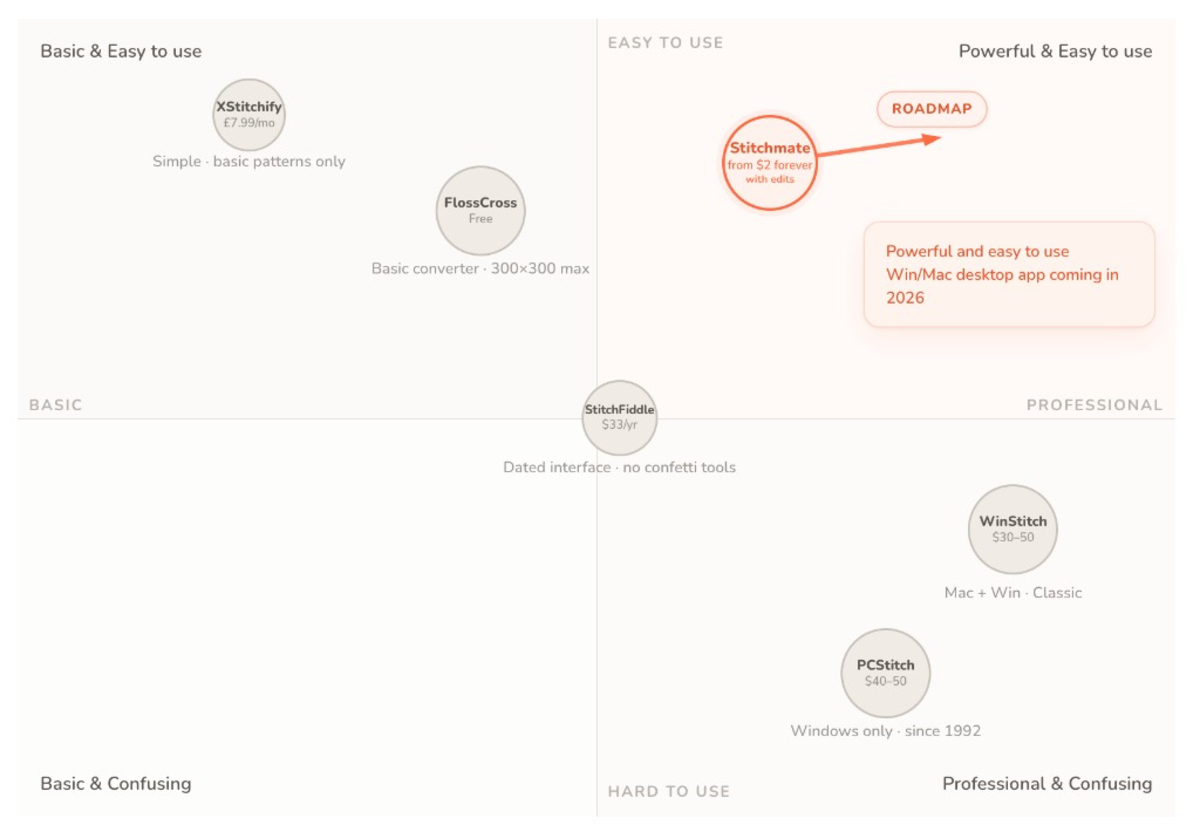
All Software Comparisons
Stitchmate side by side with each pattern tool we compare, one page per tool.