Stitchmate vs FlossCross
FlossCross is one of the best free cross-stitch tools available: no registration, no export limits, commercial use allowed, and a Pattern Keeper export. Its limits are the 300×300 pattern cap, DMC and Anchor only, and three browser-stored pattern slots. Stitchmate adds 60+ thread brands, French knots, layers, FLOW scoring, and patterns up to 2000x2000. Here's an honest comparison.
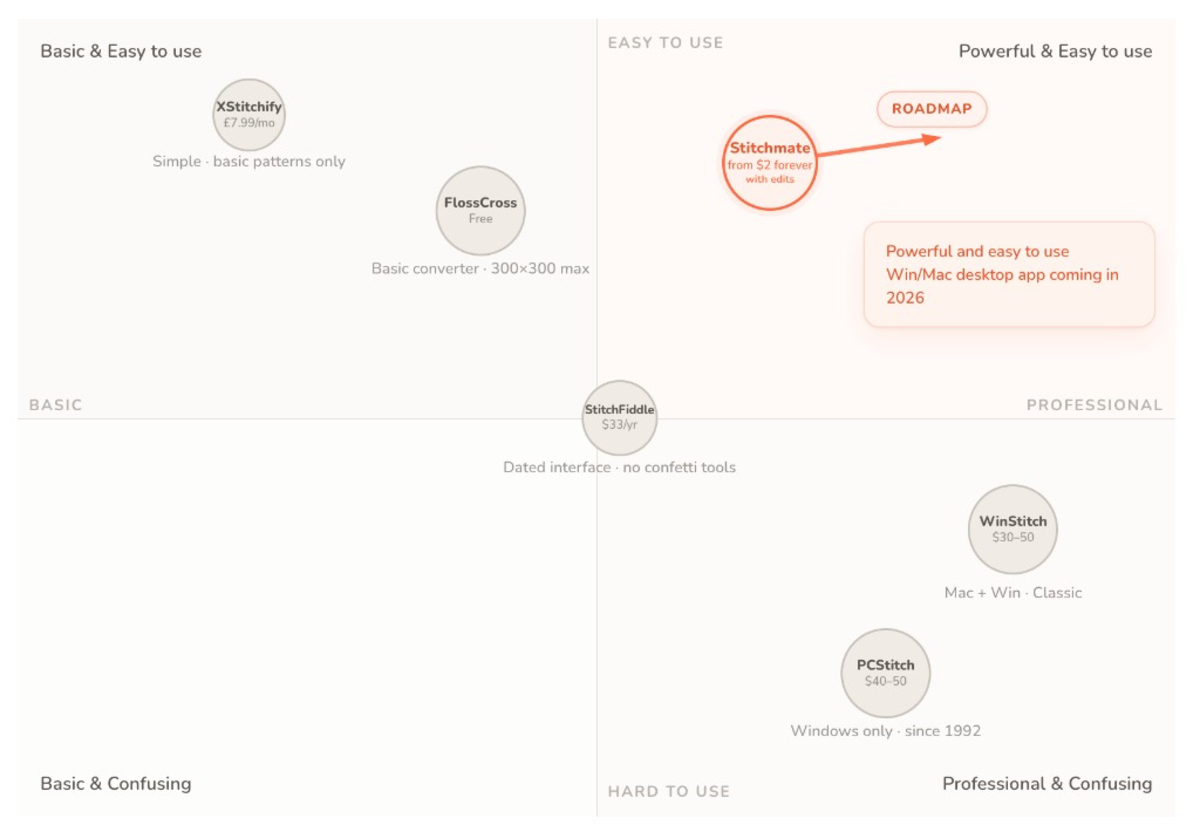
The short version
Don't have time for a deep dive? Here's the quick take.
Choose FlossCross if you...
- Want completely free with no limits on PDF export or commercial use
- Privacy is paramount (no account required, all data stays local)
- Only use DMC or Anchor threads
- Your patterns are 300x300 stitches or smaller
- Need Pattern Keeper compatible PDFs without paying
Choose Stitchmate if you...
- Use thread brands beyond DMC and Anchor (50+ available, 1-click brand remapping)
- Need patterns larger than 300x300 (up to 2000x2000 on every tier)
- Want a FLOW stitchability score on top of confetti cleanup
- Need French knots, layers, a text tool, or lasso and magic-wand selection
- Want a cloud library that syncs across devices instead of three browser slots
- Also make needlepoint, diamond painting, fuse-bead, or C2C crochet patterns
Price & philosophy
FlossCross wins on price — it's genuinely free with no restrictions on exports or commercial use. Stitchmate is free for converting, editing, PNG export, and the progress tracker; the printable PDF is paid.
| Feature | Stitchmate | FlossCross |
|---|---|---|
| Price | Free to design; PDF from $7.99 | Completely free |
| Free tier | Full editor up to 2000 x 2000, PNG export | Full PDF export |
| Registration | Optional (for cloud features) | None required |
| Commercial use | Plus Pass ($24.99 / 30 days or $149 lifetime) | Free |
| Progress tracking while stitching | ✓ Free progress tracker on any device, syncs, tracks backstitch | — |
Pattern size, threads & stitch types
Stitchmate supports larger patterns, more thread brands, French knots, and layers. Both have blended threads and fractional stitches.
| Feature | Stitchmate | FlossCross |
|---|---|---|
| Max pattern size | 2000 x 2000 | 300 x 300 |
| Thread brands | 50+ (DMC, Anchor, Cosmo, Madeira, hand-dyed, and more) | 2 (DMC + Anchor) |
| Brand remapping | ✓ (1-click across all 60+ brands) | — |
| French knots | ✓ | — |
| Blended threads | ✓ (2–4 strands, across all 60+ brands) | ✓ (DMC/Anchor blends, 1–6 strands per color) |
| Layers | ✓ | — |
| Fractional stitches | ✓ (full, half, quarter, ¾, petite) | ✓ (full, half, ¾, petite) |
| Backstitch | ✓ | ✓ |
Photo conversion & quality
Both convert photos and both fix isolated stitches. Stitchmate adds a FLOW score to predict how a pattern will feel to stitch.
| Feature | Stitchmate | FlossCross |
|---|---|---|
| Photo import | ✓ | ✓ |
| Pixel art mode | ✓ (1:1 color preservation) | ✓ ("Pixel art" import option) |
| FLOW score | ✓ (0–100 stitchability rating) | — |
| Confetti cleanup | ✓ (automatic, adjustable, global or brush) | ✓ (Fix All Isolated Crosses + brush, nearest-color replace) |
| Similar color warnings | ✓ | — |
| Image overlay | ✓ | ✓ |
Editing tools & export
| Feature | Stitchmate | FlossCross |
|---|---|---|
| Selection tools | Rect, lasso, magic wand | Rectangle (copy/paste, flip, rotate) |
| Text tool | ✓ (48 fonts) | — |
| Symmetry modes | ✓ | — |
| Pattern file import | ✓ (.OXS, .PAT, .XSD — drag & drop) | ✓ (.OXS import & export) |
| PDF export | Paid options (from $7.99) | Free |
| SVG export | ✓ (paid plans) | ✓ (free) |
| Pattern Keeper compatible | ✓ | ✓ |
| Realistic mockup previews | ✓ (frame/hoop) | — |
| Cloud storage | ✓ (auto-save, syncs across devices) | Local browser only (3 pattern slots, auto-backups, FCJSON file save) |
| OXS export | — | ✓ |
Pricing
FlossCross is free: no registration, no paid tier, and commercial use is allowed. Stitchmate offers one-time options that include future updates and never auto-renew. FlossCross details from FlossCross's site as of September 2026.
| Option | Stitchmate | FlossCross |
|---|---|---|
| Free tier | ✓ (full editor up to 2000 x 2000, PNG export, progress tracker) | ✓ (full features) |
| 1 pattern | $7.99 (PDF unlock forever, with edits) | — |
| Unlock packs | $12 for 5 ($2.40 each), $20 for 10 ($2 each), never expire | — |
| 30 days | $14.99 Personal Pass / $24.99 Plus Pass (one-time, does not renew) | — |
| Lifetime | $99 Personal Pass / $149 Plus Pass | — |
| Commercial rights | Plus Pass ($24.99 / 30 days or $149 lifetime) | Free |
How they compare in practice
FlossCross is lean and functional. The interface is simple, it respects your privacy (no account, all data local), and it costs nothing. It also covers more than its simple look suggests: blended threads, ¾ stitches, shapes, an image overlay, a fix-all for isolated crosses, Pattern Keeper export, and a realistic floss preview. Its limits are 300x300 stitches, DMC and Anchor threads, and three pattern slots stored in your browser. FlossCross itself warns that Safari can erase stored patterns after 7 days without a visit, and recommends Chrome.
Stitchmate costs more than free, so it needs to earn that difference. Where FlossCross gives you a clean result and trusts you to evaluate it, Stitchmate adds a layer of analysis — FLOW scoring rates stitchability on a 0–100 scale, and the confetti cleanup tools remove scattered stitches across the whole pattern or with a brush. It also has features FlossCross doesn't: French knots, layers, a text tool, 60+ thread brands, patterns up to 2000x2000, and .PAT/.XSD import from PCStitch and Pattern Maker. The same editor also makes needlepoint, diamond painting, fuse-bead, and C2C crochet patterns.
Neither approach is wrong. FlossCross suits stitchers who want simplicity and zero cost. Stitchmate suits those who want more depth, more thread brands, and quality assurance built in.
For hobbyists making occasional small patterns: FlossCross is hard to beat on value.
For pattern sellers or larger, complex work: FlossCross lets you sell for free. Stitchmate's Plus Pass ($24.99 for 30 days or $149 lifetime) adds the commercial license and brandless PDFs, on top of custom PDF branding, 60+ thread brands, realistic mockup previews, and quality tools that help you create professional patterns.
The best way to compare? Try both.
Both are free to start — FlossCross entirely so, Stitchmate with PNG export. See the difference for yourself.
Works on any device — phone, tablet, or computer. No download required.
All comparisons · All features · 12-program review · Pattern maker · Photo converter · DMC color chart · vs WinStitch · vs PCStitch · vs Stitchly · vs Musely
Published by Stitchmate, one of the tools compared. Last updated Sep 20, 2026; competitor details are checked against each vendor's own site.
Actively developed — 85 updates in the past year, most recently . See what's new →
Frequently Asked Questions
What's the difference between Stitchmate and FlossCross?
Both are browser-based cross-stitch pattern makers with Pattern Keeper compatible PDFs. FlossCross is completely free with no limits on exports, but limited to 300x300 patterns, DMC + Anchor, and three pattern slots stored in the browser. Stitchmate offers 60+ thread brands, French knots, layers, FLOW score quality analysis, confetti cleanup, and patterns up to 2000x2000 on every tier: converting and editing are free, and the printable PDF is the paid step.
Is FlossCross really free?
Yes, FlossCross is genuinely free with no restrictions on PDF export or commercial use. It's one of the best free options available, with blended threads, ¾ stitches, confetti fixing, and an "Export for Pattern Keeper" PDF option. The main limitations are 300x300 max pattern size, DMC + Anchor only, three pattern slots stored in the browser, and no text tool, layers, or French knots.
Does FlossCross work with Pattern Keeper?
Yes. FlossCross has an "Export for Pattern Keeper" option in its PDF export, and every paid Stitchmate option includes a Pattern Keeper compatible PDF.
Which is better for selling patterns, Stitchmate or FlossCross?
FlossCross allows free commercial use with no restrictions. On Stitchmate the commercial license comes with the Plus Pass ($24.99 for 30 days or $149 lifetime), which also removes Stitchmate branding from your PDFs. Sellers also get custom PDF branding (logo, QR code, website and social links), 60+ thread brands, patterns up to 2000x2000, FLOW scoring, and realistic mockup previews. For personal use, the PDF for a single pattern is $7.99.
What features does Stitchmate have that FlossCross doesn't?
Stitchmate offers FLOW quality scoring, 60+ thread brands (FlossCross has DMC + Anchor), French knots, layers, patterns up to 2000x2000, cloud storage, a text tool, lasso and magic-wand selection, and .PAT/.XSD import from PCStitch and Pattern Maker. Both have blended threads, confetti fixing, image overlay, and .OXS import.
Can I use FlossCross or Stitchmate for needlepoint?
Needlepointers have long used FlossCross off-label — its whole-stitch charts work on canvas — but it has no needlepoint features: charts render as crosses on Aida or evenweave, and the thread list is DMC and Anchor floss only. Stitchmate has a dedicated needlepoint mode: true tent stitch rendering, mesh-count sizing from 10 to 28 mesh, petite stitches, and wool brands including all 430 Appleton shades. You can also convert an existing cross stitch chart to needlepoint in one step.